1.6 Role & Permissions
WhoBank Admin
WhereSidebar › Role & Permissions
Permissionrole.manage
Screen titleRoles & Permission Scopes
A permission is one specific right, such as create a farmer profile (farmer.create) or record a sanction decision (facility.sanction). A role is a named bundle of permissions. Every user has exactly one role, and their role decides which sidebar items, buttons and actions they get.
This is the most sensitive screen in the workspace
Anyone holding role.manage can give any permission to any role, including themselves. Keep it with the Bank Admin only.
The screen
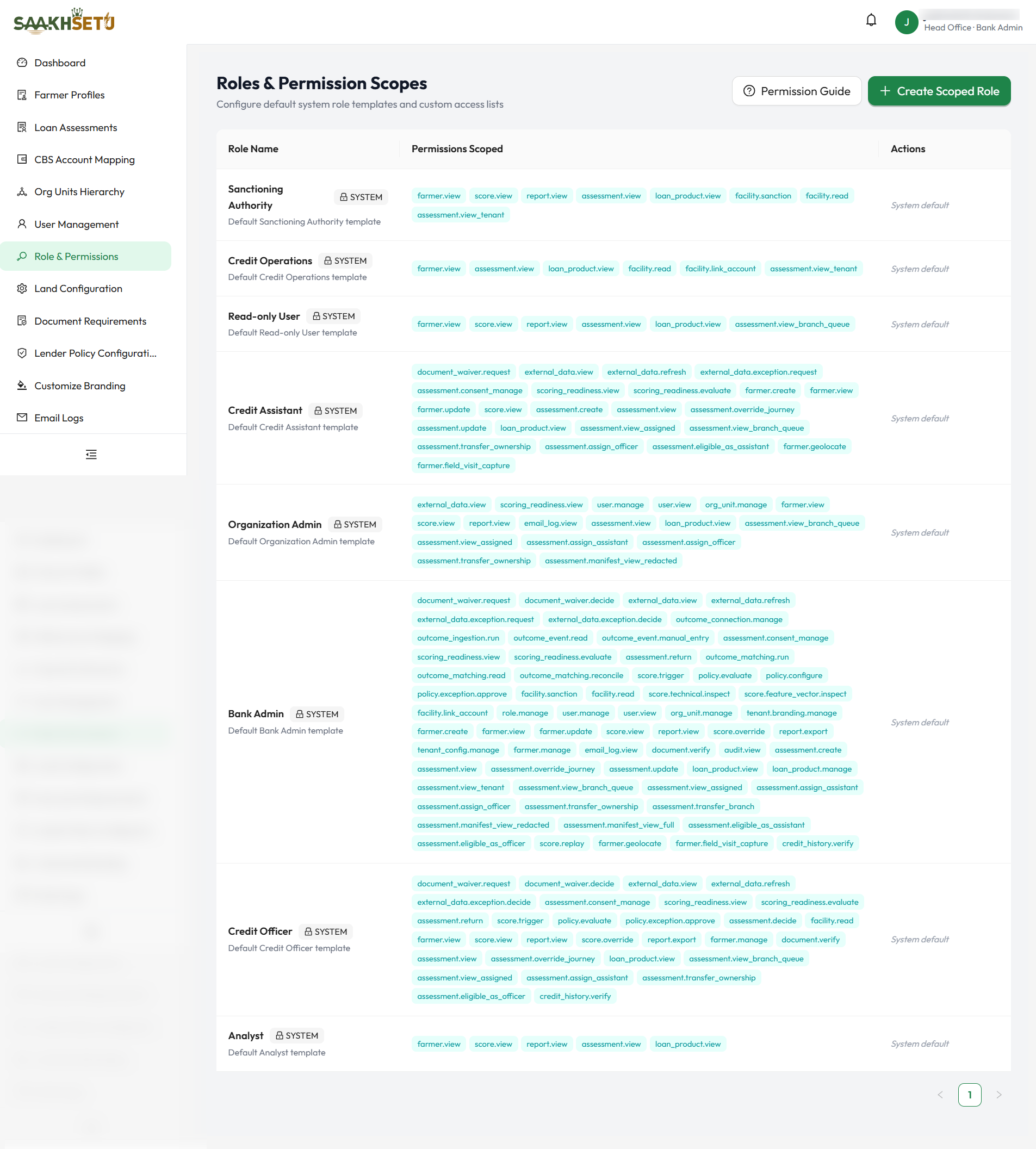
| Column | Meaning |
|---|---|
| Role Name | The role's name, with its description underneath. System roles carry a System tag with a lock icon |
| Permissions Scoped | Every permission the role holds, shown as tags |
| Actions | Edit and Delete for custom roles. System roles show System default and cannot be changed |
| Button | What it does |
|---|---|
| Permission Guide | Opens a searchable explanation of every permission, grouped by module. Use it before you grant anything |
| Create Scoped Role | Creates a new custom role |
Default roles
Every bank starts with these system roles. They reflect how agricultural lending is normally divided between people.
| Role | Purpose | Key abilities |
|---|---|---|
| Bank Admin | Owns the workspace | Every permission |
| Organization Admin | Runs branches and staffing | Manage users and org units, assign assessments to assistants and officers, view assessments in their branch queue, view email logs |
| Credit Assistant | Field and branch data capture | Create and update farmers, capture land geolocation and field visits, create and update assessments, capture consent, request document waivers and external-data exceptions, evaluate scoring readiness, assign a Credit Officer |
| Credit Officer | Review and recommendation | Verify documents and credit history, decide waivers and external-data exceptions, trigger the Yogyank score, evaluate lender policy, return assessments for correction, record a recommendation (assessment.decide), view facilities |
| Sanctioning Authority | The bank's lending decision | View assessments across the bank, record the sanction or decline (facility.sanction), view facilities. Deliberately cannot record recommendations |
| Credit Operations | Post-sanction reconciliation | View assessments across the bank, link facilities to CBS loan accounts (facility.link_account) |
| Analyst | Reporting | View farmers, scores and reports. Sees no assessments until your bank defines an access scope for it |
| Read-only User | Oversight | View farmers, scores, reports and assessments in their branch queue |
Your bank's defaults may differ
These are the template permissions at the time your bank was set up. A Bank Admin can create custom roles with different permissions. The table on the screen always shows the current truth.
Create a custom role
Create a custom role when none of the default roles fits a job, for example a Senior Credit Evaluator who verifies documents but never triggers scores.
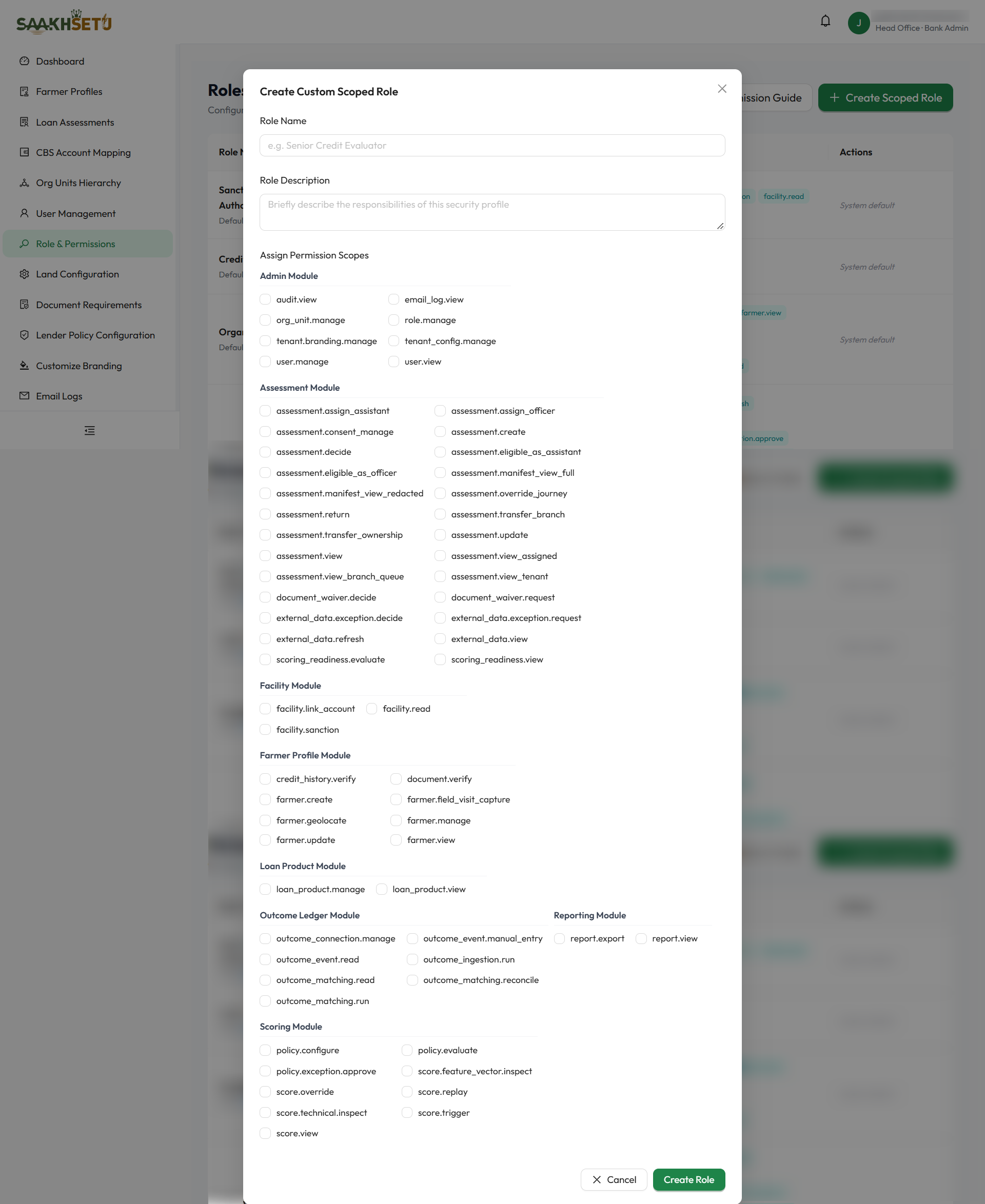
- Select Create Scoped Role.
- Enter Role Name and Role Description.
- Under Assign Permission Scopes, tick each permission the role needs. Permissions are grouped by module, and hovering over a permission shows its short description.
- Select Create Role. You see Custom role created successfully!
- Assign the role to users in User Management.
| Field | Required | What to enter | Rules |
|---|---|---|---|
| Role Name | Yes | A clear job title, e.g. Senior Credit Evaluator | 3–100 characters. Cannot be blank spaces. Must be unique in your bank |
| Role Description | Yes | One or two sentences on what this role is responsible for | Free text |
| Assign Permission Scopes | Yes | The permissions the role grants | At least one permission |
Edit or delete a custom role
- Edit: select Edit, change the description or the ticked permissions, and select Save Changes. Users holding the role get the new permissions the next time they sign in.
- Delete: select Delete, then Yes, Delete. Move users onto another role first, because users left on a deleted role can lose access.
System roles cannot be edited or deleted.
Build roles that keep duties separate
| Keep these apart | Why |
|---|---|
assessment.decide (recommend) and facility.sanction (sanction) |
The bank's decision must be independent of the recommendation. SaakhSetu also blocks it per case |
facility.sanction and facility.link_account |
Linking accounts is an operations task, not a lending decision |
document_waiver.request and document_waiver.decide |
A person should not approve their own waiver request |
external_data.exception.request and external_data.exception.decide |
Same reason as waivers |
policy.configure and policy.exception.approve |
Writing the policy is not the same as being trusted to override it |
How assessment visibility works
assessment.view lets a user open the Loan Assessments screen. Which assessments they then see is set by one or more scope permissions:
| Scope permission | User sees |
|---|---|
assessment.view_assigned |
Assessments assigned to them as Credit Assistant or Credit Officer |
assessment.view_branch_queue |
Every assessment in the branches they are permitted to see |
assessment.view_tenant |
Every assessment in the bank |
A role with no scope permission sees nothing
A role with assessment.view but none of the three scope permissions sees an empty assessment list. This is deliberate: access is denied unless it is explicitly granted.
Permission reference
The Permission Guide on screen has the full explanation of each permission. This summary is grouped the same way.
Admin
| Permission | Allows |
|---|---|
user.view |
See the staff list (read-only) |
user.manage |
Invite, edit, suspend, reactivate and unlock users |
role.manage |
Create and edit roles. Highly sensitive |
org_unit.manage |
Build and change the org hierarchy |
tenant.branding.manage |
Change logo and theme colours |
tenant_config.manage |
Land configuration and document-requirement overlays |
email_log.view |
See the system email delivery log |
audit.view |
Browse the audit trail of governed actions |
Farmer profile
| Permission | Allows |
|---|---|
farmer.view |
Open farmer profiles |
farmer.create |
Onboard a new farmer |
farmer.update |
Edit farmer profile details |
farmer.manage |
Deactivate or reactivate farmer profiles |
farmer.geolocate |
Capture or update land parcel locations |
farmer.field_visit_capture |
Record a field-visit irrigation check |
document.verify |
Verify or reject uploaded documents and record expiry dates |
credit_history.verify |
Verify a farmer's "no prior formal credit" declaration. Must be a different person from the one who made it |
Assessment
| Permission | Allows |
|---|---|
assessment.create |
Start a new loan assessment |
assessment.view |
Open loan assessments (see the scope permissions above) |
assessment.update |
Edit and submit an assessment, and start a correction after a return |
assessment.override_journey |
Override the recommended journey |
assessment.consent_manage |
Capture farmer consent by SMS OTP or in-person attestation |
assessment.return |
Return a submitted assessment for correction |
assessment.decide |
Record a Credit Officer recommendation. Never a sanction |
assessment.assign_assistant / assessment.assign_officer |
Assign or reassign the Credit Assistant or Credit Officer |
assessment.transfer_ownership |
Hand current ownership between the assigned assistant and officer |
assessment.transfer_branch |
Move an assessment to another servicing branch |
assessment.eligible_as_assistant / assessment.eligible_as_officer |
Makes users with this role selectable for that seat |
assessment.manifest_view_redacted |
View the submission record with sensitive details masked |
assessment.manifest_view_full |
View the submission record unmasked. Audit and compliance only |
document_waiver.request / document_waiver.decide |
Request, or decide, a document waiver |
external_data.view / external_data.refresh |
View the freshness of external data, or trigger a new fetch |
external_data.exception.request / external_data.exception.decide |
Request, or decide, an exception for unavailable external data |
scoring_readiness.view / scoring_readiness.evaluate |
View, or run, the check that an assessment is ready to score |
Scoring
| Permission | Allows |
|---|---|
score.view |
See the Yogyank score and its report |
score.trigger |
Generate a Yogyank score for a submitted assessment |
score.override |
Record a justified disagreement with the score. The score itself is never changed |
score.replay |
Run a governed replay of a past score. Restricted |
score.technical.inspect / score.feature_vector.inspect |
Technical drill-down into scoring evidence. Restricted |
policy.evaluate |
Run the lender policy against an assessment |
policy.configure |
Author and activate lender policy versions |
policy.exception.approve |
Approve a manual exception to a failing policy outcome |
Facility
| Permission | Allows |
|---|---|
facility.read |
View sanction decisions, facilities and their history |
facility.sanction |
Record or correct the bank's sanction or decline decision |
facility.link_account |
Link, correct or close a facility's CBS loan account number |
Loan product and reporting
| Permission | Allows |
|---|---|
loan_product.view |
View the loan product catalogue. Needed to start an assessment |
loan_product.manage |
Manage the bank's product activation and product-code mapping |
report.view / report.export |
View, or export, reports |
Outcome ledger (repayment evidence)
| Permission | Allows |
|---|---|
outcome_connection.manage |
Set up a source connection for repayment and servicing data |
outcome_ingestion.run |
Upload, validate and commit a batch of repayment events |
outcome_event.read |
View repayment and servicing events |
outcome_event.manual_entry |
Record a single event by hand |
outcome_matching.run / outcome_matching.read / outcome_matching.reconcile |
Match events to facilities, view the results, and resolve mismatches |