1.9 Lender Policy Configuration
WhoBank Admin (credit policy owner)
WhereSidebar › Lender Policy Configuration
Permissionpolicy.configure
Used byCredit Officers, when they run policy evaluation on an assessment (Module 3)
The lender policy is your bank's own set of eligibility rules. A Credit Officer evaluates an assessment against the active policy, and the result is an eligibility outcome, a lender grade and a recommended amount. This is the bank's policy layer. It sits on top of the Yogyank score and never changes the score itself.
Your bank's decision, not a default
SaakhSetu ships no real policy values. The starting template contains placeholder rules that show the format only. Every gate, grade boundary, cutoff and amount rule must come from your bank's approved credit policy.
How an evaluation uses the policy
flowchart TD
    S[Start evaluation] --> G{Eligibility gates}
    G -->|Any HARD gate fails| X[INELIGIBLE<br/>no grade, no amount]
    G -->|SOFT gate fails| R[Flag for MANUAL_REVIEW]
    G -->|All pass| B
    R --> B[Grade boundaries<br/>score to grade]
    B --> C{Cutoffs}
    C -->|Score below minimum| X
    C -->|Score in review band| MR[MANUAL_REVIEW]
    C -->|Otherwise| E[ELIGIBLE]
    MR --> A[Recommended amount rules]
E --> A| Outcome | Meaning |
|---|---|
| ELIGIBLE | Passed every gate and cutoff |
| MANUAL_REVIEW | A soft gate failed, or the score falls in the manual review band. A person must look at it |
| INELIGIBLE | A hard gate failed, or the score is below the minimum. A Credit Officer with policy.exception.approve may approve a recorded exception |
The screen
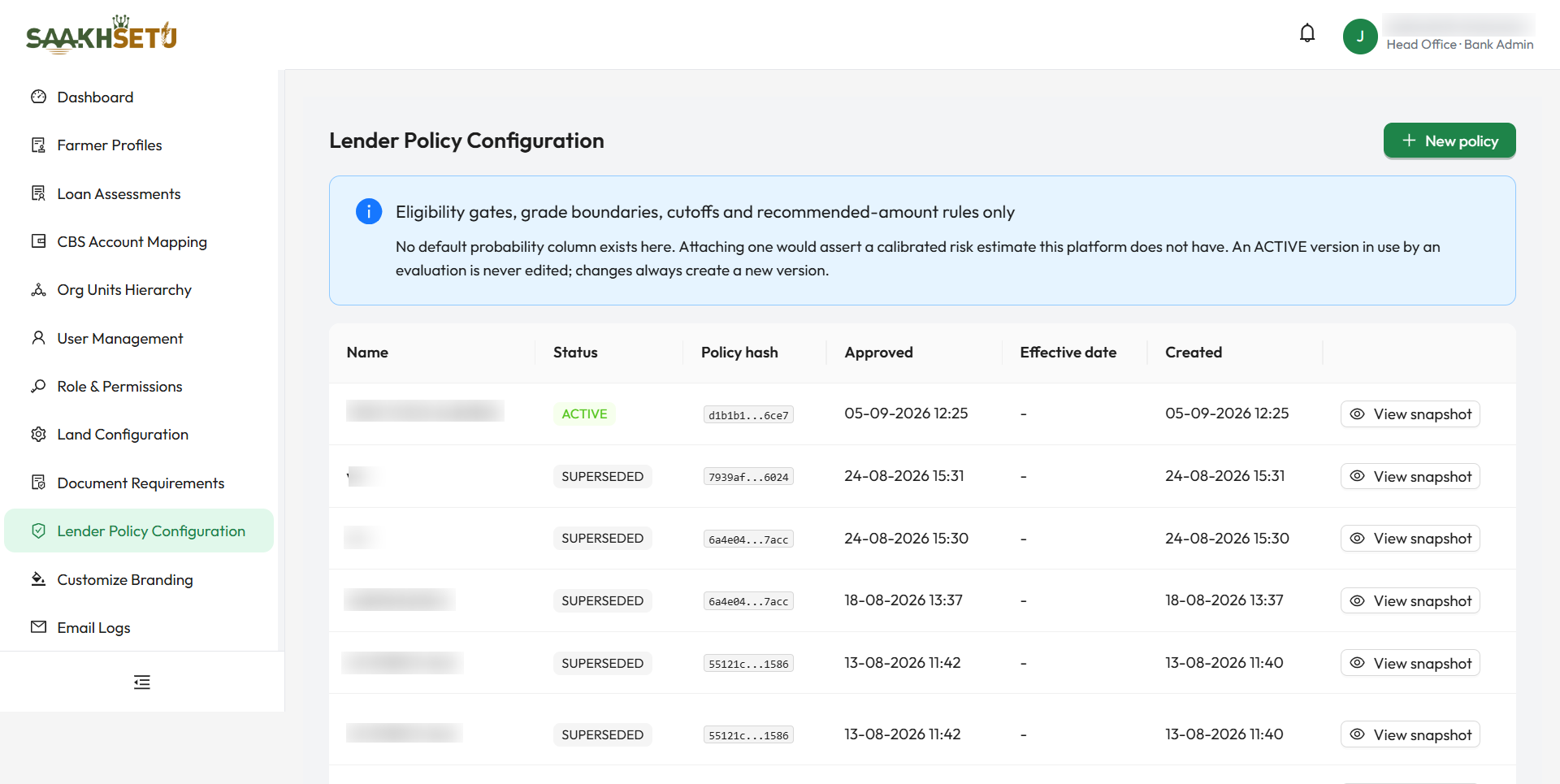
| Column | Meaning |
|---|---|
| Name | The version name, e.g. BANK-POLICY-3.1 |
| Status | Where the version is in its life cycle (see below) |
| Policy hash | A short code that identifies this exact version of the rules. Any change gives a different code, so you can always show which rules applied to a decision |
| Approved | When the version was activated |
| Effective date | The scheduled activation date, if one was set |
| Created | When the draft was created |
| Actions | View snapshot for every version. Edit and Activate for drafts |
Version statuses
| Status | Meaning |
|---|---|
| Draft | Being prepared. Has no effect on evaluations |
| Active | The one version in force for your bank. Never edited |
| Superseded | Was active and has been replaced. Kept permanently for audit |
| Withdrawn | Taken out of use |
Create a policy draft
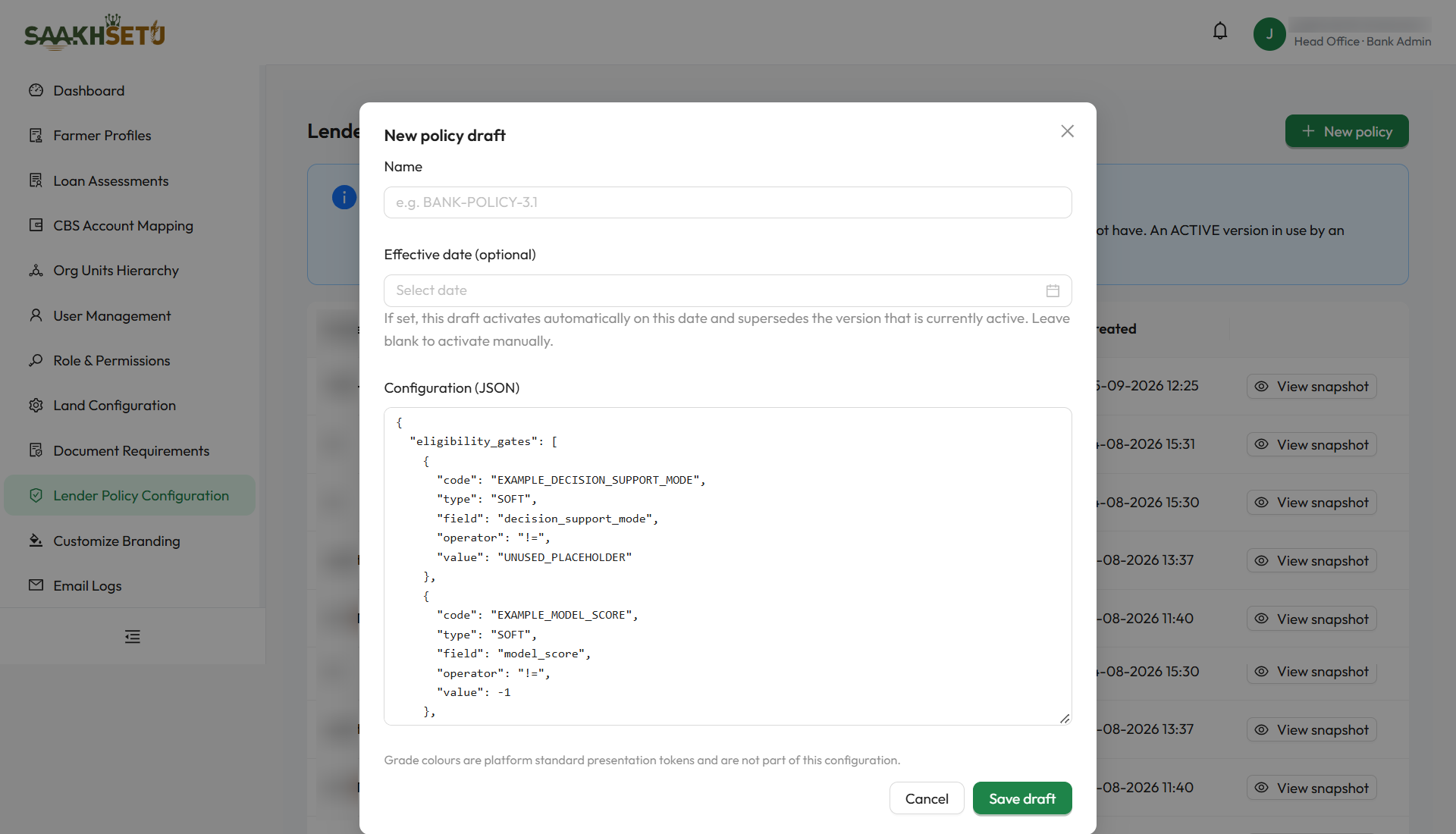
- Select New policy. The editor opens with the configuration template already filled in.
- Enter a Name.
- Optionally, set an Effective date.
- Replace the template rules in Configuration (JSON) with your bank's approved rules (see Configuration reference).
- Select Save draft. You see Draft created.
| Field | Required | What to enter | Rules |
|---|---|---|---|
| Name | Yes | A version name your credit team recognises, e.g. BANK-POLICY-3.1 | Cannot be changed after the draft is created |
| Effective date (optional) | No | The date the draft should become active | Today or later. If set, the draft activates automatically on that date and supersedes the active version. Leave it blank to activate manually |
| Configuration (JSON) | Yes | The policy rules in JSON format | Must be valid JSON. If it is not, you see Configuration must be valid JSON. |
Edit, activate and view
| Task | How | Notes |
|---|---|---|
| Edit a draft | Select Edit, change the configuration or effective date, then Save draft | Only drafts can be edited |
| Activate now | Select Activate, then confirm | The draft becomes Active, and the previously active version becomes Superseded and stays retrievable |
| Scheduled draft | Shows Scheduled for date in place of Activate | Activates automatically on that date. To activate sooner, edit the draft and clear the date |
| View snapshot | Select View snapshot | A read-only view of the exact rules, the full policy hash, and who approved it and when |
Changing the active policy
Never try to change rules in place. Create a new draft, ideally starting from a copy of the active snapshot, then activate it. The old version stays on record, so you can always show which rules applied to a past decision.
Configuration reference
The configuration has four sections.
1. eligibility_gates: pass or fail checks, evaluated first
Each gate is one rule:
| Key | Meaning | Values |
|---|---|---|
code |
Your name for the gate, shown as a reason code | e.g. MAX_APPLIED_AMOUNT |
type |
What happens if the gate fails | HARD: the outcome is INELIGIBLE and evaluation stops. SOFT: the outcome becomes MANUAL_REVIEW but evaluation continues |
field |
What the gate checks | One of the five fields below |
operator |
How the field is compared | >=, <=, >, <, ==, !=, in, not_in |
value |
What it is compared against | A number, text, or a list for in and not_in |
Fields a gate may check (no other field is accepted):
field |
Meaning |
|---|---|
decision_support_mode |
YOGYANK_ASSISTED (a Yogyank score is available) or RULE_BASED_ONLY |
model_score |
The Yogyank score, from 0 to 1000. Empty under rule-based-only mode |
basic_eligibility_amount |
The basic eligibility amount from the assessment's eligibility step |
assessed_eligibility_amount |
The assessed eligibility amount from the eligibility step |
applied_amount |
The amount the farmer applied for. Always present |
2. grade_boundaries: score to grade
A list of { "grade", "min_score", "max_score" } entries, inclusive at both ends. Used only when a Yogyank score is available. Make sure the ranges do not overlap and do not leave gaps.
3. cutoffs
| Key | Meaning |
|---|---|
min_eligible_score |
Scores below this are ineligible |
manual_review_band |
[from, to]: scores in this range go to manual review |
4. recommended_amount_rules
These are applied to the assessment's assessed eligibility amount, never to the score.
| Key | Meaning |
|---|---|
product_limits |
Maximum amount per loan product |
exposure_caps.per_farmer_max |
Maximum total for one farmer, or null for none |
margin_percentage |
Margin to apply, or null |
grade_amount_multiplier |
Multiplier per grade, e.g. { "A": 1.0, "B": 0.9 } |
tenure_months_by_product |
Tenure per product. Recorded for reference, not used in the amount |
5. score_version_tables: different thresholds for different scoring models (optional)
Each version of the Yogyank model may need its own score thresholds. A score of 700 from one model does not have to mean the same as 700 from another. score_version_tables holds a separate table for each scoring model version, and each table may carry its own cutoffs, grade_boundaries, score-based eligibility_gates and, optionally, recommended_amount_rules.
| Configuration style | Which scoring models it can evaluate |
|---|---|
Flat: sections 1–4 only, no score_version_tables |
Only the original model versions, A0.3 and A0-RD25-v1 |
Model-aware: with score_version_tables |
Only the model versions that have a table, for example YOGYANK-EA-v1 |
Two rules apply:
- If the active policy has no table for the model that produced a score, evaluation is refused with
MODEL_NOT_CONFIGURED_IN_POLICY. SaakhSetu never borrows another model's thresholds. - When you use
score_version_tables, any gate onmodel_scoremust sit inside a table, never in the top-leveleligibility_gates. Gates on the other fields can stay at the top level, where they apply to every model.
Check with Arbix which model versions are live
Before you activate a model-aware policy, confirm which model versions your bank's scoring uses, so that every one of them has a table.
Example shape
The values below are illustrative only. Use your bank's approved figures. This is the flat style. For model-aware configuration, move cutoffs, grade_boundaries and any score gates into a table under score_version_tables, keyed by model version.
{
  "eligibility_gates": [
    { "code": "MAX_APPLIED_AMOUNT", "type": "HARD", "field": "applied_amount", "operator": "<=", "value": 300000 },
    { "code": "SCORE_PRESENT", "type": "SOFT", "field": "decision_support_mode", "operator": "==", "value": "YOGYANK_ASSISTED" }
  ],
  "grade_boundaries": [
    { "grade": "A", "min_score": 800, "max_score": 1000 },
    { "grade": "B", "min_score": 650, "max_score": 799 },
    { "grade": "C", "min_score": 0, "max_score": 649 }
  ],
  "cutoffs": { "min_eligible_score": 450, "manual_review_band": [450, 599] },
  "recommended_amount_rules": {
    "product_limits": {},
    "exposure_caps": { "per_farmer_max": null },
    "margin_percentage": null,
    "tenure_months_by_product": {},
    "grade_amount_multiplier": { "A": 1.0, "B": 0.9, "C": 0.75 }
  }
}
Grade colours are fixed
Grade colours are platform display standards and are not part of the configuration. The policy also has no "probability of default" column: SaakhSetu does not claim a calibrated risk estimate it does not have.