3.12 Sanction Decision
WhoSanctioning Authority
WhereAssessment summary › Sanction Decision panel
Permissionfacility.sanction to decide. facility.read to view
AvailableOnce a Credit Officer recommendation exists
The sanction decision is the bank's own lending decision. It is separate from, and made by a different person than, the Credit Officer's recommendation.
Separation of duties
The person who recorded the recommendation can never sanction the same case. If they try, SaakhSetu shows The sanctioning user may not be the author of the recommendation being sanctioned.
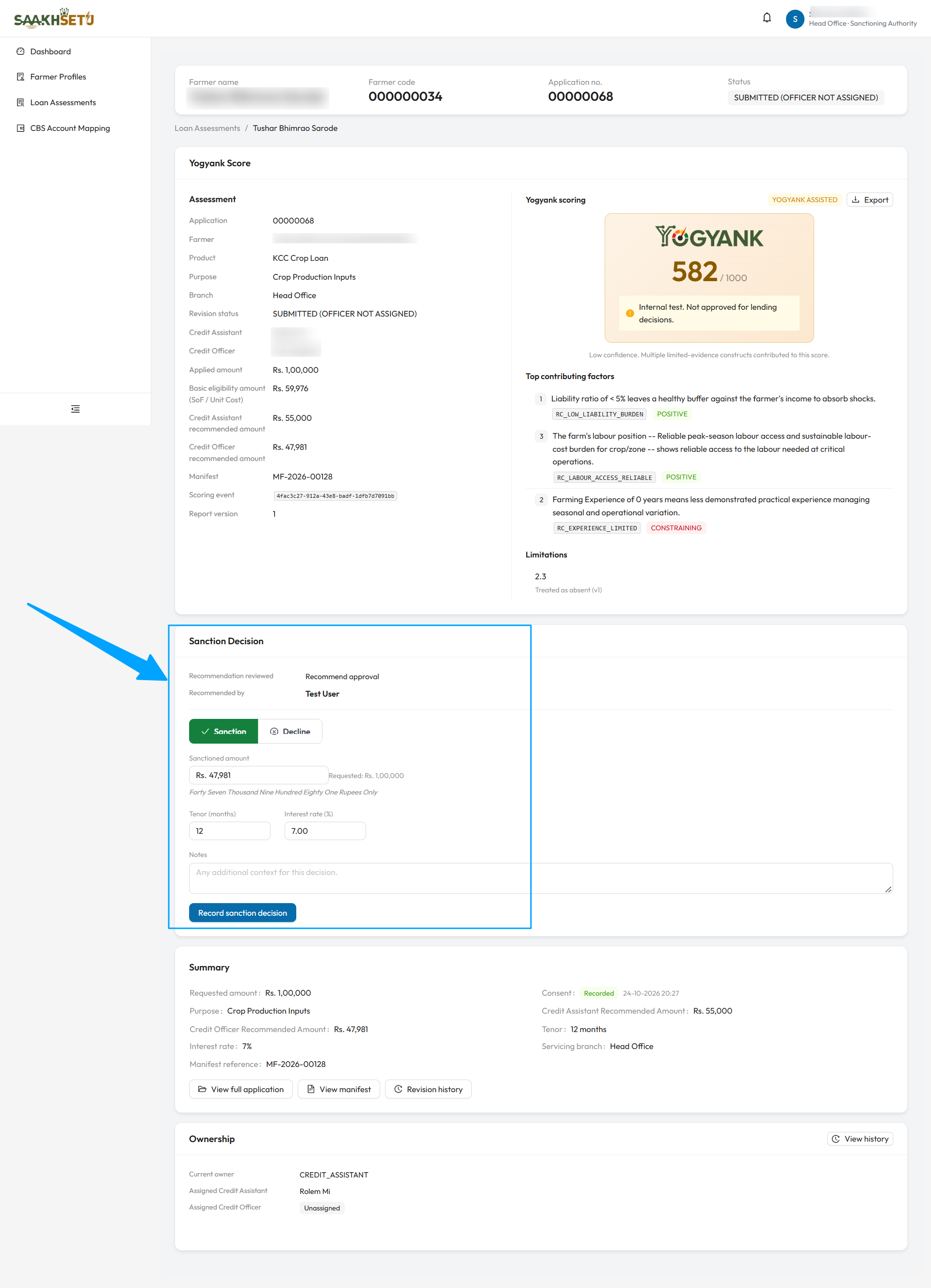
The arrow points to the Sanction Decision panel. It shows the Recommendation reviewed (Recommend approval) and who it was Recommended by. Sanction is pre-selected, and the Sanctioned amount is filled with the Credit Officer's recommended amount, next to the requested amount for comparison. The tenor and interest rate come from the application.
Record the decision
The panel first shows the Recommendation reviewed and who it was Recommended by.
- Review the score, the policy outcome and the recommendation above the panel.
- Choose Sanction or Decline. It is pre-selected to match the recommendation.
- Fill in the fields below.
- Select Record sanction decision. You see Sanction decision recorded for Assessment {number}.
| Field | Required | What to enter | Rules |
|---|---|---|---|
| Sanctioned amount | Yes, to sanction | The amount the bank sanctions | Pre-filled from the officer's recommended amount. More than 0, and not above the requested amount |
| Tenor (months) | Yes, to sanction | Sanctioned tenor | 1 to 600. Pre-filled from the application |
| Interest rate (%) | Yes, to sanction | Sanctioned rate | 0 to 100. Pre-filled from the application. A hint shows the applied values if you change them |
| Reason for decline | Yes, to decline | At least one structured reason | Same list as the officer's rejection reasons |
| Divergence justification | Yes, when sanctioning against a Recommend rejection | Why your decision differs from the recommendation | |
| Notes | No | Any additional context |
What happens next
| Decision | Result |
|---|---|
| Sanction | Status SANCTIONED. A credit facility is created, Awaiting account link, for Credit Operations (3.13). For a renewal of a linked facility, a renewal cycle is added to that facility |
| Decline | Status DECLINED |
Both outcomes are final for the application. It can no longer be scored, returned or edited.
The recorded decision
The panel shows the outcome (Sanctioned or Declined) with an Immutable tag, the amount, tenor and rate or the decline reasons, any divergence from the recommendation, the Facility status, the Cycle (Initial or Renewal), and who decided it and when.
Correct a decision
If a decision was recorded wrongly, select Correct this decision. A correction does not edit the original: it creates a new active decision, and the original is kept as superseded in the Correction history.
| Field | Required |
|---|---|
| Sanctioned / Declined, with the same fields as above | Yes |
| Correction reason | Yes: Why is this correction being made? |
A linked facility cannot be reversed
Changing Sanctioned → Declined is allowed only while the facility is still awaiting an account link. The reversal then cancels the facility. Once the CBS account is linked, a sanction cannot be reversed. If the bank decides not to disburse, use Mark not disbursed on the facility instead (3.13).