3.7 Assessment Summary & Ownership
WhoEveryone working on the assessment
WhereLoan Assessments › View
Permissionassessment.view. Each panel needs its own permission
The assessment summary is the home page of one application. After submission it is where the review happens: score, policy, recommendation and sanction are all recorded here.
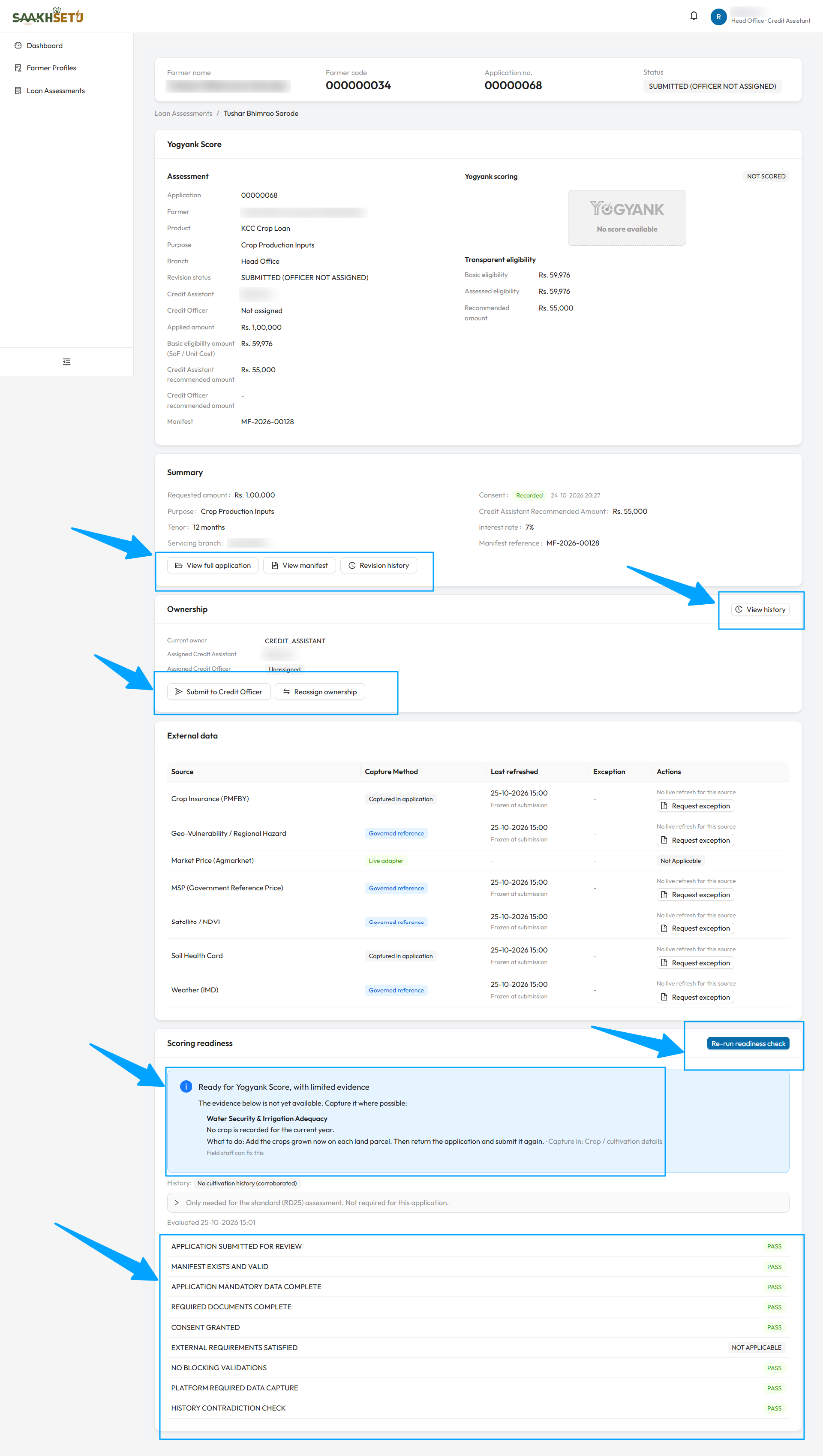
The arrows point to View full application, View manifest and Revision history; View history and the ownership buttons Submit to Credit Officer and Reassign ownership; and the Re-run readiness check button with the readiness result and its list of checks. In this example, the status is SUBMITTED (OFFICER NOT ASSIGNED), so the score card shows NOT SCORED and the Credit Officer is Not assigned.
Page layout (top to bottom)
| Section | Shown to | See |
|---|---|---|
| Identity card (stays at the top): farmer name, farmer code, Application no., status | Everyone | |
| Yogyank Score | score.view, after submission |
3.9 |
| Lender Policy Evaluation and Recommendation | policy.evaluate or assessment.decide |
3.10 |
| Sanction Decision | facility.sanction or facility.read, once a recommendation exists |
3.12 |
| Summary, with action buttons | Everyone | Below |
| Ownership | Everyone | Below |
| Document Waivers | When waivers exist | 3.4 |
| External data | external_data.view, after submission |
Below |
| Scoring readiness | scoring_readiness.view |
3.8 |
Summary
| Row | Meaning |
|---|---|
| Requested amount | The applied amount |
| Consent | Recorded with date, Test consent, or Not recorded with Capture consent |
| Purpose | Loan purpose |
| Credit Assistant Recommended Amount | From submission |
| Role Recommended Amount | The Credit Officer's amount, once recorded |
| Tenor, Interest rate, Servicing branch | Application terms and branch |
| Manifest reference | The submission snapshot, after submission |
| Button | What it does | Shown to |
|---|---|---|
| View full application | A read-only view of everything captured, step by step, including documents with preview and the consent trace | Everyone |
| View manifest | The frozen submission snapshot | assessment.view |
| Revision history | Every revision of the application | Everyone |
| Return for correction | Sends the application back. See 3.11 | assessment.return |
| Start correction | Begins correcting a returned application | assessment.update |
Submission manifest
The manifest is the exact data frozen at submission. What you see depends on your permission:
| Level | Permission | Shows |
|---|---|---|
| Summary | assessment.view |
Reference, scoring reference date, and counts of parcels, crops, loans, documents and sales |
| Redacted | assessment.manifest_view_redacted |
Every section, with financial and credit figures masked |
| Full | assessment.manifest_view_full |
Everything, unmasked. You must give a reason, and the access is recorded in the audit trail |
Revision history
| Column | Meaning |
|---|---|
| Revision | 1 for the original, then one more per correction |
| Status | Working (being edited), Submitted, or Superseded (replaced by a later revision) |
| Manifest, Scoring | The revision's manifest and number of scoring events |
| Mode, Yogyank | Decision support mode and whether the score is visible, withheld or not scored (with score.view). The score value is never shown here |
| Return reasons, Parent | Why it was returned, and which revision it came from |
Ownership and assignment
The Ownership panel shows the current owner (the role holding the application now) and the assigned Credit Assistant and Credit Officer.
| Button | What it does | Permission |
|---|---|---|
| Assign Credit Assistant | Puts a Credit Assistant on the case | assessment.assign_assistant |
| Submit to Credit Officer | Assigns a Credit Officer. It does not submit a draft | assessment.assign_officer |
| Reassign ownership | Hands current ownership between the assigned Credit Assistant and Credit Officer | assessment.transfer_ownership |
| Transfer branch | Moves the application to another servicing branch, with optional replacement staff | assessment.transfer_branch (Bank Admin) |
| View history | Every assignment, transfer and reason | Everyone |
Every action needs a reason. Only users from the assessment's branch whose role is eligible for the seat are offered.
External data
After submission, the External data panel lists each external data source used for scoring:
| Column | Meaning |
|---|---|
| Source | e.g. market prices, satellite vegetation, rainfall |
| Capture Method | How the data is obtained: live, governed reference, verified declaration, captured in the application, or test only |
| Last refreshed | When it was fetched, Frozen at submission, or a status such as Available, Failed, Unavailable, Fresh or Stale |
| Exception | Any exception request and its status |
| Actions | Refresh, Request exception, or Approve / Deny |
| Action | Who | Detail |
|---|---|---|
| Refresh | external_data.refresh |
Fetches the source again, where a live refresh exists |
| Request exception | Credit Assistant (external_data.exception.request) |
When a source cannot be obtained. Explain why. One pending request per source |
| Approve / Deny | Credit Officer (external_data.exception.decide) |
Decides the request. A denial needs a reason |
An approved exception lets the readiness check pass that requirement by exception.