3.10 Policy Evaluation & Recommendation
WhoCredit Officer
WhereAssessment summary › Lender Policy Evaluation card
Permissionpolicy.evaluate, policy.exception.approve, assessment.decide
Once the application is scored, SaakhSetu evaluates it against your bank's active lender policy (see 1.9). The Credit Officer then records a recommendation. A recommendation is never the bank's sanction: that is a separate decision by a different person (3.12).
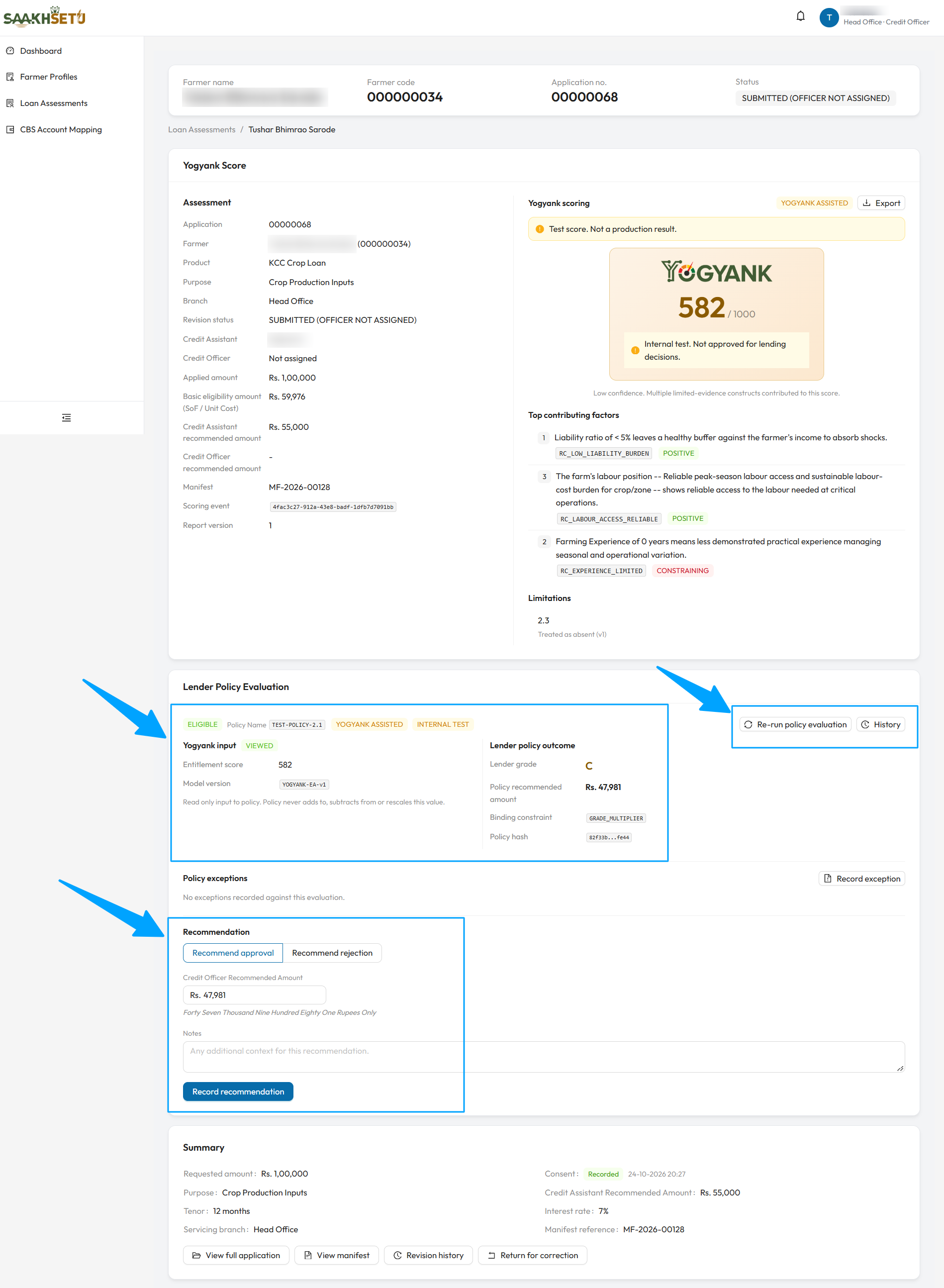
The arrows point to Re-run policy evaluation and History; the evaluation result (here ELIGIBLE, with the viewed score, Lender grade C, a Policy recommended amount and the Binding constraint); and the Recommendation form, already filled with the policy amount. Record exception and the No exceptions recorded message sit between them.
Policy evaluation
The evaluation runs automatically after the score is generated, and again after a report is regenerated. Select Run policy evaluation or Re-run policy evaluation to run it yourself. History lists every evaluation for this revision.
Outcome
| Outcome | Meaning |
|---|---|
| Eligible | Passes every gate and cutoff |
| Manual Review | A soft gate failed, or the score falls in the manual review band. Grade and amount are still calculated |
| Ineligible | A hard gate failed, or the score is below the minimum. No grade and no amount |
| Section | Shows |
|---|---|
| Failed eligibility gates | For an ineligible case: each failed hard gate, with its reason code, field, configured value and actual value |
| Gates flagged for manual review | Each failed soft gate |
| Yogyank input | The Entitlement score and model version, and whether you have VIEWED the report. The policy never changes the score |
| Lender policy outcome | Lender grade (e.g. A–E), Policy recommended amount, the Binding constraint that limited the amount, and the Policy hash, a short code identifying which policy version was used |
Under rule-based only mode there is no Yogyank input and no grade.
Policy exceptions
An officer with policy.exception.approve can record a policy exception with Record exception:
| Field | Required | What to enter |
|---|---|---|
| Exception type | Yes | e.g. EXPOSURE_CAP_RELAXATION |
| Justification | Yes | The reason and, where applicable, the approving authority |
An exception never changes the outcome
The exception is stored as a separate, permanent record next to the evaluation. The computed outcome, grade and amount stay exactly as they were.
Record the recommendation
- Open the score report in the Yogyank Score card. Under Yogyank-assisted mode this is required: SaakhSetu checks that you viewed the exact report version.
- Under Recommendation, choose Recommend approval or Recommend rejection.
- Fill in the fields below.
- Select Record recommendation. You see Recommendation recorded.
| Field | Required | What to enter | Rules |
|---|---|---|---|
| Recommendation | Yes | Recommend approval or Recommend rejection | |
| Credit Officer Recommended Amount | Yes, for approval | The amount you recommend | Pre-filled with the policy amount. More than 0, and not above the requested amount |
| Reason | Yes, for rejection | At least one structured reason | From the list below |
| Notes | No | Any additional context |
Rejection reasons:
| Reason |
|---|
| Limited banking history |
| Seasonal or concentrated income pattern |
| Insufficient repayment capacity for requested amount |
| Submitted evidence does not support the application |
| Existing exposure with this or another lender too high |
| Land or holding title unclear or disputed |
| Conflicting evidence requires further investigation |
Ineligible cases
When the policy outcome is Ineligible, Recommend approval is blocked: Approval is currently blocked. Recommend rejection, or return the application if its data needs correcting.
Rules
| Rule | Message |
|---|---|
| One recommendation per revision | A recommendation already exists for this revision. |
| Report must be viewed (assisted mode) | REPORT_NOT_VIEWED: select Open score report, then try again |
| The evaluation must match the current decision support mode | DECISION_SUPPORT_MODE_CHANGED: select Re-run policy evaluation, then record again. Nothing was saved |
| A returned or replaced revision cannot be recommended | Work on the current revision |
After recording
The recorded recommendation is shown to everyone who can see the panel, tagged Recorded: the recommendation, amount, decision support mode, the Yogyank score at that moment, the report version, the reasons, notes, and who decided it and when.
- It is labelled This is a Credit Officer recommendation, not the bank's final sanction decision.
- The application can no longer be returned for correction.
- The Sanction Decision panel becomes available to the Sanctioning Authority.