2.5 Land Parcels & Soil Health
WhoCredit Assistant (capture), Credit Officer (soil verification)
WhereFarmer profile › Land Parcels tab
Permissionfarmer.update. document.verify to confirm soil evidence
Before you startThe bank's land measurement unit must be set
A land parcel is one piece of land the farmer cultivates, identified by its survey number. Every crop, irrigation record and location in SaakhSetu belongs to a parcel, so parcels must be captured before crops.
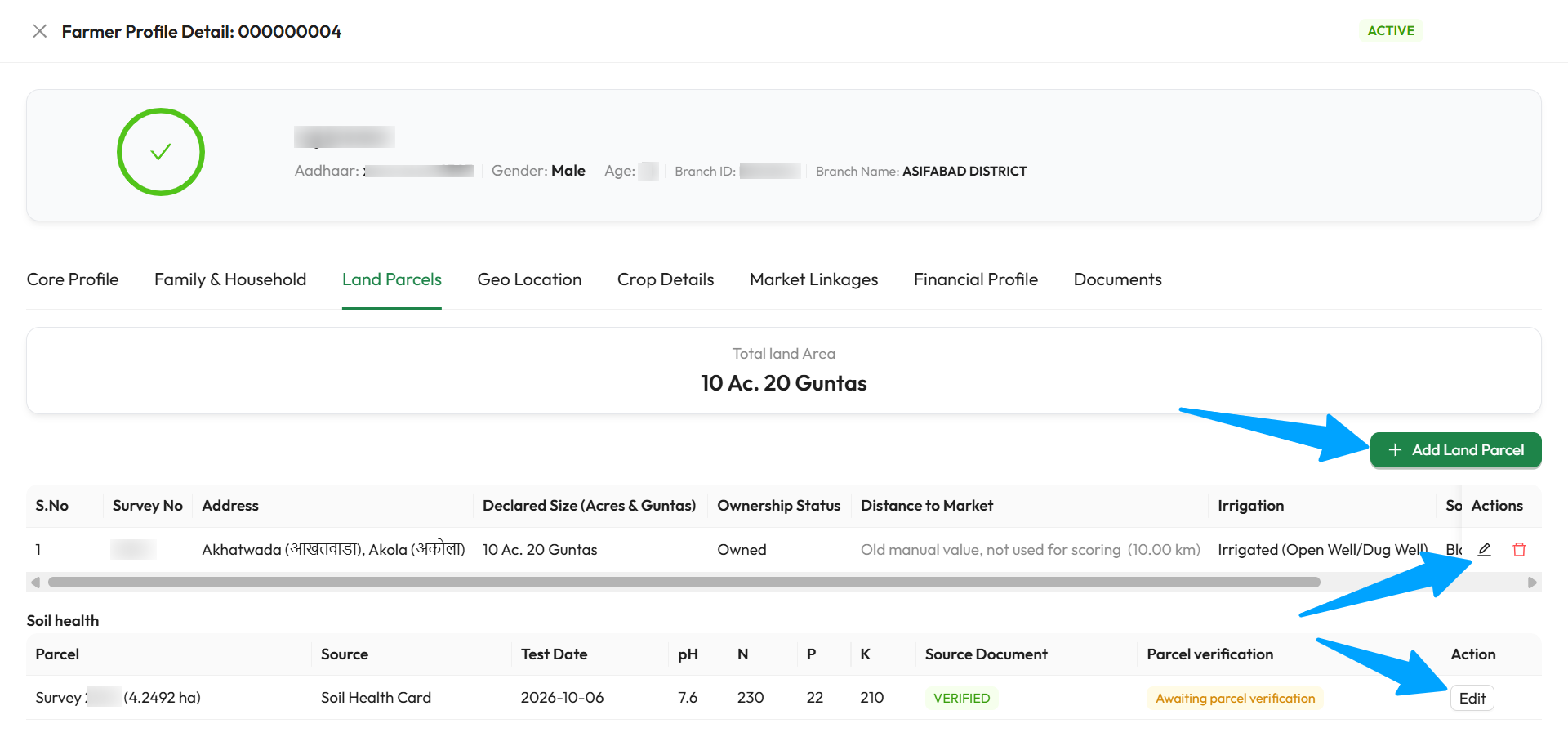
The arrows point to Add Land Parcel, the parcel's edit and retire icons, and Edit in the Soil health section. The soil test shows Awaiting parcel verification until a Credit Officer records it.
Land configuration required
If you see Land configuration required, your Bank Admin has not yet chosen the land measurement unit. Add Land Parcel stays disabled until they do. See 1.7 Land Configuration.
The parcel table
Total land Area at the top adds up all active parcels, in your bank's unit.
| Column | Meaning |
|---|---|
| S.No, Survey No | Row number and the parcel's survey number |
| Address | Village and taluk |
| Declared Size (unit) | Area as declared, in your bank's unit |
| Ownership Status | Owned or Leased/Sharecropped |
| Distance to Market | Distance to the nearest mandi, worked out by SaakhSetu. See Distance to market |
| Irrigation | Rainfed, or Irrigated (type) |
| Soil Type, Soil Texture | As recorded, or - |
| Actions | Edit (pencil) and Retire (bin) |
Add a land parcel
- Select Add Land Parcel. Register New Land Parcel opens, with the location copied from the farmer's residential address.
- Fill in the parcel details, agronomic details and the Cultivation Continuity & Operating Security section.
- Optionally, open Soil Evidence & Salt Condition and record the evidence.
- Select Save. You see Land parcel saved.
Parcel details
| Field | Required | What to enter | Rules |
|---|---|---|---|
| Survey Number | Yes | The survey or khasra number from the land record | Up to 50 characters |
| Declared Area Size | Yes | The parcel's area, in your bank's unit | Hectares: up to 4 decimals. Acres & Guntas: whole acres plus 0–39 guntas. Acres & Cents: whole acres plus 0–99 cents |
| State, District, Taluk, Village | Yes | Where the parcel is | Pre-filled from the residential address. Change from the top: each choice clears the ones below it |
Agronomic & market details
| Field | Required | What to enter | Rules |
|---|---|---|---|
| Ownership Status | Yes | Owned or Leased/Sharecropped | |
| Irrigation Status | Yes | Rainfed or Irrigated | |
| Irrigation Type | Yes, if Irrigated | The irrigation source type | This is the only place the parcel's irrigation type is set. Crop-level irrigation records use it |
| Distance to Market | Read-only | Worked out by SaakhSetu | Never typed |
| Soil Type | No | From the list | |
| Soil Texture | No | From the list |
Soil Evidence & Salt Condition (optional panel)
Records where the soil type and texture information came from, and the salt condition.
Soil Type Evidence and Soil Texture Evidence each have:
| Field | Required | What to enter |
|---|---|---|
| Raw Source Value | Yes, once a Mapping Status is chosen | The value exactly as received from the source |
| Mapping Status | No | Canonical resolved (mapped to a governed reference value), Unresolved (raw value could not be mapped yet) or Legacy unverified (carried over, never re-verified) |
| Source Dataset | No | e.g. NBSS&LUP |
| Source Reference, Source Dataset Version, Source Payload Hash, Legend Version, Spatial Resolution Basis | No | Details of the source, if known |
| Observation Date | No | When the observation was made |
Salt Condition is recorded on its own and is never worked out from soil type or texture:
| Salt-Affected State | Meaning |
|---|---|
| Not assessed | Never checked (default) |
| Unknown | Checked, but the result was inconclusive |
| None detected | Assessed, and clean |
| Saline | Measured: a saline condition is present |
| Sodic | Measured: a sodic condition is present |
You can also add a Source Reference and Observation Date for the salt condition.
Cultivation continuity & operating security
These questions are about cultivation and operating facts, never the form of tenure. An owner, a registered tenant and a sharecropper answer the same questions, and equal farming facts earn an equal score.
Required for new parcels
Every question below is required when you add a parcel. When editing an older parcel, you may save without them, but complete them when you can.
| Field | Required | What to enter |
|---|---|---|
| Verified continuous cultivation (months) | Yes | Completed months of continuous cultivation of this parcel by this farmer that the evidence actually supports, not what the farmer claims. Set to 0 if no acceptable evidence was found |
| Verification date | Read-only | Always today: continuity must be confirmed afresh at each assessment |
| Cultivation continuity evidence | Yes | PACS record, Panchayat / local authority record, FPO record, Input purchase evidence, Produce sale evidence, Field verification, Parcel's captured location / boundary, Lease documentation, Other verifiable evidence or No acceptable evidence found |
| Supporting document | Yes, for document-based evidence | The uploaded document that supports it. Upload it in the Documents tab first |
| Forward operating horizon | Yes | Finite term (states an end date), Open-ended, confirmed (no end date) or None (no corroborated forward horizon) |
| Horizon end date | Yes, for a finite term | The end date stated in the evidence |
| Horizon corroborated by | Yes, for finite or open-ended | Registered instrument, remaining term, Statutory / heritable tenancy confirmed, Documented family cultivation right, Institutional / cooperative allotment, Ownership record, Attested written arrangement with a stated term or Local authority / PACS confirmation |
| Supporting document (horizon) | Yes, for finite or open-ended | The document that corroborates it |
| Right to cultivate began on | Yes for a finite term. Also for ownership, mutation or allotment records of a farmer who started recently or never cultivated. Otherwise optional | The lease or tenancy start, mutation or purchase date, or allotment date shown on the document. Not in the future, and before the horizon end date |
| Known discontinuity | Yes | None known, or Discontinuity known (a checked fact that contradicts continued cultivation, such as a possession dispute or a notified surrender) |
| Supporting document (discontinuity) | Yes, if a discontinuity is known | The document evidencing it |
| Expected to continue next crop cycle? | Yes | Yes or No |
| Crop & season decision | Yes | Who has the final say: Farmer, Both / jointly or Another party. A tenant or sharecropper who decides is still Farmer |
| Input & agronomic management | Yes | Same options |
| Timing of critical operations | Yes | Same options |
Evidence options that are not available yet
- Field verification cannot be used yet as continuity evidence. Choose another evidence class.
- Parcel's captured location / boundary needs a location captured first in Geo Location. For a brand-new parcel, choose another evidence class, then update it after capturing the location.
Re-verify every year
When you edit a parcel whose continuity was verified more than 12 months ago, a warning asks you to verify it again. An older verification no longer counts.
Edit or retire a parcel
- Edit: select the pencil icon. Edit Registered Land Parcel opens with the saved values.
- Retire: use this for land the farmer no longer cultivates. Select the bin icon, enter a Reason, and select Retire. You see Land parcel retired.
Retirement cannot be undone
A retired parcel no longer counts toward the farmer's land area or land fragmentation index. It cannot be edited, take new crops, or have its location changed. Its history stays on record.
Distance to market
SaakhSetu works out the distance from the parcel's pin point (captured in Geo Location) to the nearest mandi. You never type it.
| You see | Meaning |
|---|---|
| 12.40 km to the nearest mandi | Worked out successfully |
| Capture the parcel's pin point | No location captured yet |
| No mandi reference for this district yet | SaakhSetu has no mandi data for this district |
| Computed by the platform from the parcel's pin point once it is captured. | A new parcel, not yet located |
| Old manual value, not used for scoring | A value typed in an older version. It is ignored |
Soil health
The Soil health section under the parcel table records soil test results from a Soil Health Card or an NABL-accredited lab report, for each parcel.
flowchart LR
    A[Upload the card or lab report<br/>in Documents] --> B[Officer verifies<br/>the document]
    A --> C[Add soil test<br/>for the parcels it covers]
    B --> D[Officer records<br/>parcel verification]
    C --> D
    D --> E[Valid]
Add a soil test
- Upload the Soil Health Card or NABL Lab Report in the Documents tab.
- In Soil health, select Add soil test on the parcel's row.
- Fill in the fields and select Save.
| Field | Required | What to enter | Rules |
|---|---|---|---|
| Parcels covered by this record | Yes | The parcel(s) the card covers | Choose more than one only if the card lists each parcel's survey number. Each parcel gets its own record |
| Evidence Source | Yes | Soil Health Card or NABL Accredited Lab | |
| Linked Source Document | Yes | The uploaded card or lab report | Must be a Soil Health Card or NABL Lab Report document |
| Soil Test / Sample Date | Yes | When the sample was tested | Not in the future |
| pH | Yes | Soil pH | 0 to 14 |
| Nitrogen, Phosphorus, Potassium (kg/ha) | Yes | N, P and K values from the report | 0 or more |
| Lab / Scheme Reference (optional) | No | Card number or lab report reference |
Record verification (Credit Officer)
Once the document is Verified, an officer with document.verify selects Record verification on the parcel row and confirms that the verified card or report covers that parcel. This cannot be changed afterwards. Editing a soil test means it must be verified again.
| Coverage status | Meaning |
|---|---|
| Valid | Usable: document verified, parcel confirmed, and not out of date |
| Awaiting parcel verification | An officer still needs to record verification |
| Card not verified | Verify the source document first |
| Card too old | A Soil Health Card is valid until the third anniversary of its test date. NABL lab reports do not expire |
| Document rejected or expired | Upload a new document |
| No soil test | Nothing recorded for this parcel |