3.13 CBS Account Linking
WhoCredit Operations
WhereSidebar › CBS Account Mapping
Permissionfacility.read to view. facility.link_account to link, correct or close
When a loan is sanctioned, SaakhSetu creates a credit facility. After the loan is disbursed in the Core Banking System (CBS), Credit Operations links the facility to its CBS loan account number. This connects SaakhSetu's decision record to what actually happens to the loan, including its repayment history.
Facility lifecycle
stateDiagram-v2
    [*] --> Awaiting: Sanction recorded
    Awaiting --> Linked: Link CBS account
    Awaiting --> NotDisbursed: Mark not disbursed
    Awaiting --> Cancelled: Sanction reversed
Linked --> Superseded: Correct account number| State | Meaning |
|---|---|
| Awaiting account link | Sanctioned. Waiting for its CBS account number |
| Linked | Linked to a CBS loan account |
| Not disbursed | The sanction stands, but the bank chose not to disburse. Can never be linked |
| Cancelled before link | The sanction was reversed before any account was linked |
| Superseded | Replaced by a corrected facility |
The work queue
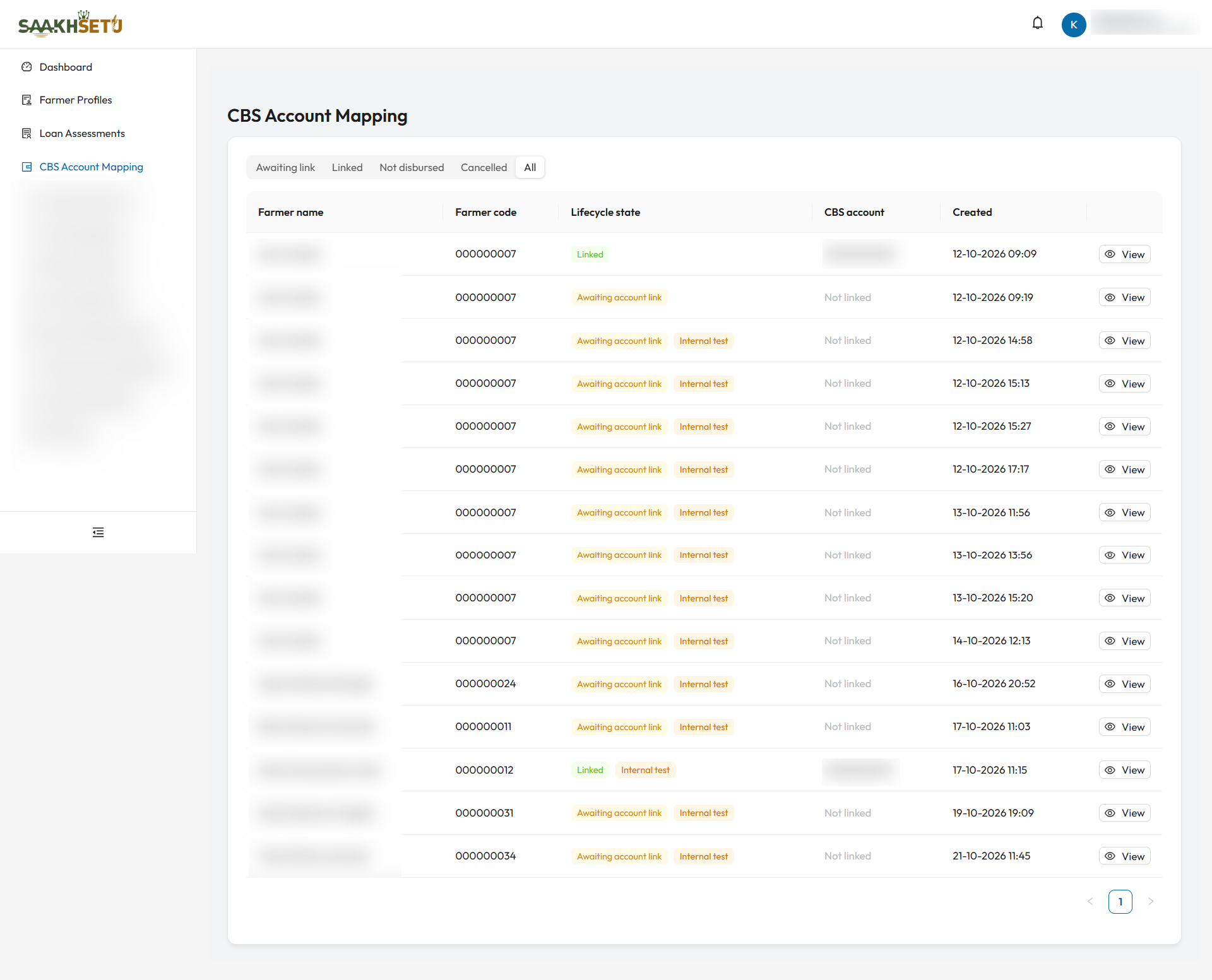
This example uses the All filter. Most facilities show Awaiting account link with Not linked, and two show Linked with their CBS account hidden. The orange Internal test tag marks facilities created from test scores. Never link a real CBS account to one of those.
The queue opens on Awaiting link, oldest first, so the longest-waiting facilities are at the top. The other filters are Linked, Not disbursed, Cancelled and All. Select View to open a facility.
Internal test facilities
A facility created from an internal test score carries an orange Internal test tag and a warning banner. Never link a real CBS account to it.
Facility detail
Shows the farmer, lifecycle state, CBS loan account (or Not linked), link source, the relevant dates and reasons, and the Cycle history (Initial and Renewal cycles).
| State | Buttons |
|---|---|
| Awaiting account link | Link CBS account, Mark not disbursed |
| Linked | Correct account number, and Link renewal onto new account if a renewal cycle is waiting |
Link the CBS account
- Open a facility that is Awaiting account link and select Link CBS account.
- Type the account number exactly as in CBS, in CBS loan account number.
- Type it again in Re-enter the account number to confirm.
- Select Confirm link. You see Account linked.
| Rule | Detail |
|---|---|
| Typed twice | Both entries must match: The two entries do not match. Copying and pasting is blocked, so the number must be typed |
| Masked | The number is hidden while you type |
| Unique | One account number can be linked to only one active facility: This loan account identifier is already linked to another facility. |
Check against CBS
A wrong account number silently corrupts the repayment evidence that later flows back into SaakhSetu. Always copy the number from the CBS disbursement record, never from memory.
Correct an account number
For a Linked facility with a wrong number, select Correct account number, enter the corrected number twice, give a Correction reason, and select Confirm correction. The existing facility is superseded, and a new one is created with the corrected number, carrying over all open cycles. The page then opens the new facility.
Link a renewal onto a new account
When a renewal is sanctioned on a linked facility and the bank opens a new CBS account for it, select Link renewal onto new account and enter the new number twice. This creates a new servicing identity for the renewal cycle. The earlier facility and its history stay unchanged.
Mark not disbursed
If the bank decides not to disburse a sanctioned loan:
- Open the facility (it must be Awaiting account link) and select Mark not disbursed.
- Enter the Reason the bank did not disburse.
- Select Confirm. You see Facility closed as not disbursed.
The sanction remains valid, but this facility can never be linked afterwards.