2.9 Financial Profile
WhoCredit Assistant (capture), Credit Officer (verify)
WhereFarmer profile › Financial Profile tab
Permissionfarmer.update to capture. document.verify to verify income and classify loans. credit_history.verify to verify a no-prior-credit declaration
The Financial Profile tab holds everything about the farmer's money: banking behaviour, income, farm machinery, livestock, labour, allied activities and existing credit. All seven sections sit one under another on the same tab.
| # | Section | Captures |
|---|---|---|
| 1 | Banking | Savings account behaviour, balances and transaction counts |
| 2 | Annual Income | Income per fiscal year, and its verification |
| 3 | Mechanization Assets | How the farmer gets access to machinery |
| 4 | Livestock | Animals owned, value and insurance |
| 5 | Labour Resilience | Whether labour is available at the busiest times |
| 6 | Allied Livelihood | Dairy, poultry, fishery and similar activities |
| 7 | Credit History | Existing loans, defaults, and the no-prior-credit declaration |
Read-only when inactive
If the farmer is inactive, or you do not have farmer.update, every section is read-only.
Fiscal years
Fiscal years run April to March and are written as YYYY-YY, for example 2024-25. Where a figure must cover a full year, only the last three completed fiscal years are offered. The year in progress is not.
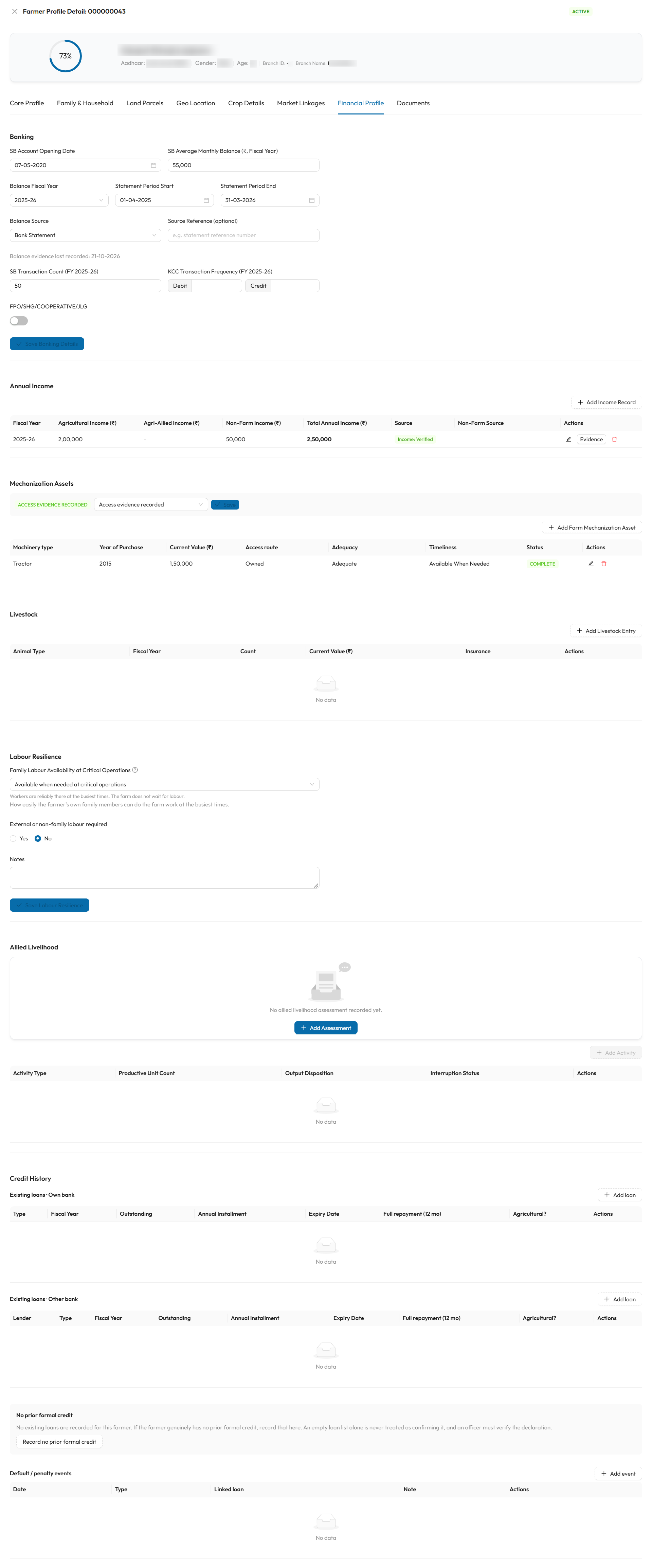
All seven sections sit on one screen, in the order described below. In this example, the income record shows Income: Verified, and the farmer's tractor row shows Complete.
Banking
Fill in the fields and select Save Banking Details (enabled once you change something). You see Banking details saved.
| Field | Required | What to enter | Rules |
|---|---|---|---|
| SB Account Opening Date | No | When the farmer's savings account was opened | Not in the future |
| SB Average Monthly Balance (₹, Fiscal Year) | See note | Average monthly balance over one fiscal year | 0 or more |
| Balance Fiscal Year | See note | The fiscal year that balance covers | Last three completed fiscal years |
| Statement Period Start / End | See note | The dates of the passbook or statement you used | Not in the future. Start must not be after End |
| Balance Source | See note | Passbook or Bank Statement | |
| Source Reference (optional) | No | e.g. the statement reference number | Up to 250 characters |
| SB Transaction Count (FY …) | No | Number of savings-account transactions in that fiscal year | 0 or more. If the statement period is not about 12 months, a warning reminds you this is recorded as a 12-month count |
| KCC Transaction Frequency (FY …) | No | Number of Debit and Credit transactions on the Kisan Credit Card account in that year | 0 or more |
| FPO/SHG/COOPERATIVE/JLG | No | Switch on if the farmer is a member of a farmer producer organisation, self-help group, cooperative or joint liability group |
Balance details go together
Average balance, Balance Fiscal Year, Statement Period Start, Statement Period End and Balance Source must be all filled in or all left blank. A balance cannot be saved with only some of them.
Annual Income
One row per fiscal year. Select Add Income Record, fill in the form and select Save.
| Field | Required | What to enter | Rules |
|---|---|---|---|
| Fiscal Year | Yes | The year the income relates to | Last three completed years. A year already recorded shows (already recorded) and cannot be chosen again: edit that row instead |
| Agricultural Income (₹) | Yes | Income from crops | 0 or more |
| Agri-Allied Income (₹) | No | Income from dairy, poultry, fishery and similar | Leave blank if not stated. Blank is not the same as zero |
| Non-Farm Income (₹) | Yes | Income from outside farming | 0 or more |
| Non-Farm Income Source | No | e.g. Spouse works as a school teacher | Up to 250 characters |
The table adds the three figures into Total Annual Income (₹). Use the pencil icon to edit and the bin icon to delete a row.
Income verification
The Source column shows whether the figure has been independently checked:
| Tag | Meaning |
|---|---|
| Declared | Entered from the farmer's own statement. Not verified |
| Income: Awaiting verification | A supporting document was sent for verification |
| Income: Verified | An officer verified it |
| Income: Rejected | An officer rejected it |
To verify an income figure, select Evidence on its row. The Income evidence window has two cards.
Income document
- Credit Assistant: upload the supporting document in the Documents tab first.
- In Income document, select that uploaded document, its Document type, and how many months it covers (1–12, default 12). Then select Send for verification.
- Credit Officer (
document.verify): first verify the document itself in the Documents tab. Then open Evidence again and select Verify or Reject.
| Field | Options |
|---|---|
| Document type | Salary certificate or Form 16, Pension order, Income tax return, Business accounts, Bank statement |
| months | 1 to 12 |
Verify the document first
Verify stays disabled until the attached document is itself Verified in the Documents tab. Sending a figure again resets it to Awaiting verification.
Bank statement for the year (optional)
Attach a bank statement for the same year in the same way. A statement covering all 12 months supports the income figure. A shorter statement is recorded as it is.
Mechanization Assets
Access state
Start with the grey box above the table. It records whether the farmer was asked about machinery:
| Option | Meaning |
|---|---|
| Not assessed: the farmer has not been asked yet | Default |
| No mechanisation access (verified) | You checked: the farmer has no access to machinery |
| Access evidence recorded | The farmer has access. The asset table becomes editable |
A fourth state, Mechanisation not materially required, may appear. SaakhSetu sets it from the farmer's crops and scale, and it cannot be changed here.
Select Save in the box after changing it. Add Farm Mechanization Asset appears only when the state is Access evidence recorded.
Add an asset
| Field | Required | What to enter | Rules |
|---|---|---|---|
| How does the farmer access this machinery? | Yes | Owned, Hired, Shared, FPO or cooperative, Custom Hiring Centre, Contracted service | Ownership is only one route: all of them count |
| Machinery type | No | e.g. tractor, harvester | From the list |
| Year of Purchase | No | Year bought | Only for Owned. Not in the future |
| Current Value (₹) | No | Present value | Only for Owned |
| Adequacy for crop and scale | No | Adequate, Partially Adequate or Inadequate | |
| Availability when needed | No | Available When Needed, Sometimes Delayed or Frequently Delayed |
A row is Incomplete until access route, adequacy and availability are all filled in. Select Complete on such a row to finish it. Complete rows show Complete.
Livestock
Select Add Livestock Entry:
| Field | Required | What to enter | Rules |
|---|---|---|---|
| Animal Type | Yes | e.g. cow, buffalo, goat | From the list |
| Fiscal Year | Yes | The year this count applies to | |
| Count | Yes | Number of animals | 1 or more |
| Current Value (₹) | Yes | Total present value of these animals | 0 or more |
| Insurance Company | No | The insurer, if insured | Clearing it removes the policy from this entry |
| Policy Number | No | The policy number | The same policy number cannot be recorded twice for the same insurer |
| Coverage Amount (₹) | No | Sum insured | 0 or more |
| Valid Upto | No | Policy end date |
One row per animal type and year
Adding an entry for an animal type and fiscal year that already exists updates the existing row instead of creating a second one.
Labour Resilience
Whether the farm can get workers at critical operations: the busiest, time-sensitive jobs such as sowing, weeding and harvesting. Select Save Labour Resilience after changing anything.
| Field | Required | What to enter |
|---|---|---|
| Family Labour Availability at Critical Operations | No | How easily the farmer's own family can do the work at the busiest times |
| External or non-family labour required | No | Yes or No |
| External Labour Availability at Critical Operations | No (shown only for Yes) | How easily outside workers (hired, shared or from a group) can be found |
| Paid / External Labour Cost (₹), FY … | Yes, when shown | Average paid or external labour cost per cultivated season in that fiscal year, not the cost of one season |
| Period | Fixed | Per season |
| Notes | No | Anything relevant |
Availability levels:
| Level | Meaning |
|---|---|
| Severe shortage at critical operations | Workers are very hard to find at the busiest times. Work is often delayed or left undone |
| Available, but with constraints | Workers can be arranged, but with real difficulty: too few, too costly or late |
| Generally available; occasional minor delays | Usually there when needed. Occasional short delays, but work gets done in time |
| Available when needed at critical operations | Reliably there. The farm does not wait for labour |
| You record | What happens |
|---|---|
| External labour required = Yes, with a severe shortage | You are asked to Confirm the severe shortage before saving |
| Family labour = severe shortage, but external labour required = No | Not allowed: the record contradicts itself |
Allied Livelihood
Allied activities are dairy, poultry, fishery, sericulture and similar. First record an assessment, then add each activity.
Assessment
Select Add Assessment (or Edit Assessment):
| Field | Required | What to enter |
|---|---|---|
| Assessment Reference Date | Yes | The date the enquiry relates to |
| Overall Enquiry State | Yes | One of the states below |
| Observed At | No | When the information was observed |
| Enquiry state | Meaning |
|---|---|
| Not Asked | The farmer has not been asked yet |
| Present | The farmer has allied activities. Add each one below |
| Affirmatively Absent | It was confirmed, with evidence, that the farmer has none |
| Unknown | Asked, but the answer could not be established |
| Incomplete | The enquiry was started but not finished |
Closing as Affirmatively Absent: every check is required
Choosing Affirmatively Absent opens a closure checklist. All parts must be answered and, except where noted, answered Yes:
| Check | Required answer |
|---|---|
| Complete, non-leading activity coverage checked | Yes |
| Explicit current/recent-normal-cycle negative confirmed | Yes |
| Explicit no output/use/sale/retention/barter confirmed | Yes |
| Cycle / shock / temporary-absence check completed | Yes |
| Field visit occurred | Yes or No |
| Field observation consistent with absence | Yes (asked only if a field visit occurred) |
| Bank-predefined internal contradiction checked | Yes |
| Bank-internal source set checked | Name the source checked, e.g. Core banking transaction feed |
| No material contradictory indication remains | Yes |
| Audit Note | A written explanation |
You cannot close as Affirmatively Absent while activities are still recorded under the assessment. Remove them first.
Activities
Select Add Activity. This is available once an assessment exists and its state is not Affirmatively Absent.
| Field | Required | What to enter |
|---|---|---|
| Activity Type | Yes | e.g. dairy, poultry, fishery |
| Linked Livestock Holding | No | The matching livestock entry, if any |
| Productive Unit Count | No | e.g. number of milch animals, birds or ponds |
| Water Area (hectares) | No | For fishery |
| Cycle / Batch Descriptor | No | e.g. two broiler batches per year |
| Output Disposition | No | Sold, Household Consumed, Retained or Other or Mixed |
| Allied Income Contribution Present | No | Yes / No |
| Active Months Pattern | No | e.g. Year-round or Oct-Mar |
| Output / Income Frequency | No | e.g. Weekly, seasonal |
| Continuity History | No | How long and how steadily it has run |
| Interruption Status | No | Normal Off-Season, Temporary Interruption or Discontinued |
| Interruption Detail, Notes | No | Free text |
The optional Evidence & Provenance panel records, for output scale, continuity, disposition and interruption, the evidence reference, how confident it is (Verified, Provisional, Unverified or Contradictory), and the period it covers.
Credit History
Existing loans
Loans are listed in two tables, Existing loans · Own bank and Existing loans · Other bank. Select Add loan above either table.
| Field | Required | What to enter | Rules |
|---|---|---|---|
| Own bank / Other bank | Yes | Who lent the money | For Own bank, the lender is set to your bank automatically |
| Lender | Yes, Other bank only | The bank or NBFC | From the master list |
| Loan type | Yes | KCC, Term Loan, Vehicle Loan or Personal Loan | |
| Fiscal Year | Yes | The year these figures relate to | |
| Outstanding balance (₹) | Yes | Amount still owed | 0 or more |
| Annual Installment amount (₹) | Yes | Total repayment due per year | 0 or more |
| Expiry Date | Yes | When the loan ends | |
| Full repayment in last 12 months | Yes | Yes, No or Not sure | Whether every due amount was paid in full over the last 12 months |
Classify a loan (Credit Officer)
The Agricultural? column shows whether a loan has been classified from a credit bureau report:
| Tag | Meaning |
|---|---|
| Not classified | Default |
| Agricultural | An agricultural facility, with its open date |
| Non-agricultural | Not an agricultural facility |
A user with document.verify selects Classify on the row:
| Field | Required | What to enter |
|---|---|---|
| Classification | Yes | Agricultural, Non-agricultural or Not classified |
| Verified bureau report | Yes, unless Not classified | The bureau report the decision is based on. Only verified documents are offered: upload and verify the report in the Documents tab first |
| Facility opened on (from the bureau report) | Yes, for Agricultural | The open date shown on the bureau report. Not in the future |
Each save is kept as a new record, and earlier classifications remain as history.
Default / penalty events
Record any default or penalty against a loan with Add event:
| Field | Required | What to enter |
|---|---|---|
| Linked loan | Yes | The loan the event relates to |
| Event type | Yes | From the list |
| Event date | Yes | Not in the future |
| Note | No | Up to 250 characters |
No prior formal credit
When the farmer has no loans recorded, a No prior formal credit block appears. An empty loan list is never taken as proof on its own: the farmer's declaration must be recorded and then verified by a different person.
flowchart LR
    A[Credit Assistant records<br/>the declaration] --> B[Declared, not yet verified]
    B --> C[A different officer with<br/>credit_history.verify verifies it]
C --> D[Verified: no prior formal credit]- Credit Assistant: select Record no prior formal credit, set As of (defaults to today) and select Save. You see Declaration recorded. An officer must now verify it.
- Officer (
credit_history.verify, and not the person who recorded it): select Verify declaration and complete the fields below.
| Field | Required | Options / rules |
|---|---|---|
| How it was verified | Yes (verify) | Branch officer field verification, Credit bureau / registry check: no record found or Documentary evidence reviewed |
| Evidence reference | Yes (verify) | e.g. the field verification report reference. Up to 200 characters |
| As of | Yes | The date the position applies to. Not in the future |
| Status | Meaning |
|---|---|
| Declared, not yet verified | Recorded, awaiting verification. Credit History cannot be completed yet |
| Verified: no prior formal credit | Verified with real evidence. To change it, use Replace with a new declaration, which must be verified again |
| Superseded by later credit evidence | Credit evidence was later found. Record a new declaration only if it is still accurate |
Separation of duties
The person who records the declaration can never verify it. A verification also needs real evidence, not the farmer's own word.