3.6 Eligibility & Submission
WhoCredit Assistant
WhereWizard › Eligibility calculation and Review and submit
Permissionassessment.update. assessment.assign_officer to pick an officer at submission
Eligibility
SaakhSetu calculates two mechanical eligibility figures. No machine-learning model is used for either.
| Figure | How it is worked out |
|---|---|
| Basic Eligibility Amount | From the Scale of Finance (crop, district, season and year rates × cultivated area) or, for term loans, the Unit Cost (unit cost × financed units) |
| Assessed Eligibility | (Income × the product's income multiplier) minus existing loan obligations, capped at the Basic Eligibility Amount |
In journeys that have no separate Eligibility calculation step, both figures and the line items appear on the Review and submit step, as shown in the screenshot below.
| Element | Meaning |
|---|---|
| Financed units (term loans only) | Enter the number of units being financed, then select Recompute |
| Line items table | For each crop: Basis (Planned or Actual), crop, season, parcel, district, area, rate per hectare and subtotal, adding up to Basic eligibility |
| Both figures were last computed … | When they were calculated. Recompute if crop, land or income data has changed since |
| Alert | Meaning and action |
|---|---|
| The eligibility is out of date | The data has changed since the last calculation. Select Recalculate eligibility before submitting |
| Eligibility is not calculated | It could not be worked out, with the reason. Submission can go ahead, and the reason is saved with it |
| Some rows have no scale-of-finance rate | Those crops are left out of the subtotal |
Common reasons a figure cannot be calculated: no crop records for the fiscal year, no Scale of Finance or Unit Cost rate configured for the product or district, no income multiplier configured, or no income record for the farmer.
Eligibility never blocks an application
The figures are advisory. If they cannot be calculated, the application can still be submitted, but an out-of-date figure must be recalculated first.
Review and submit
The last step brings the application together.
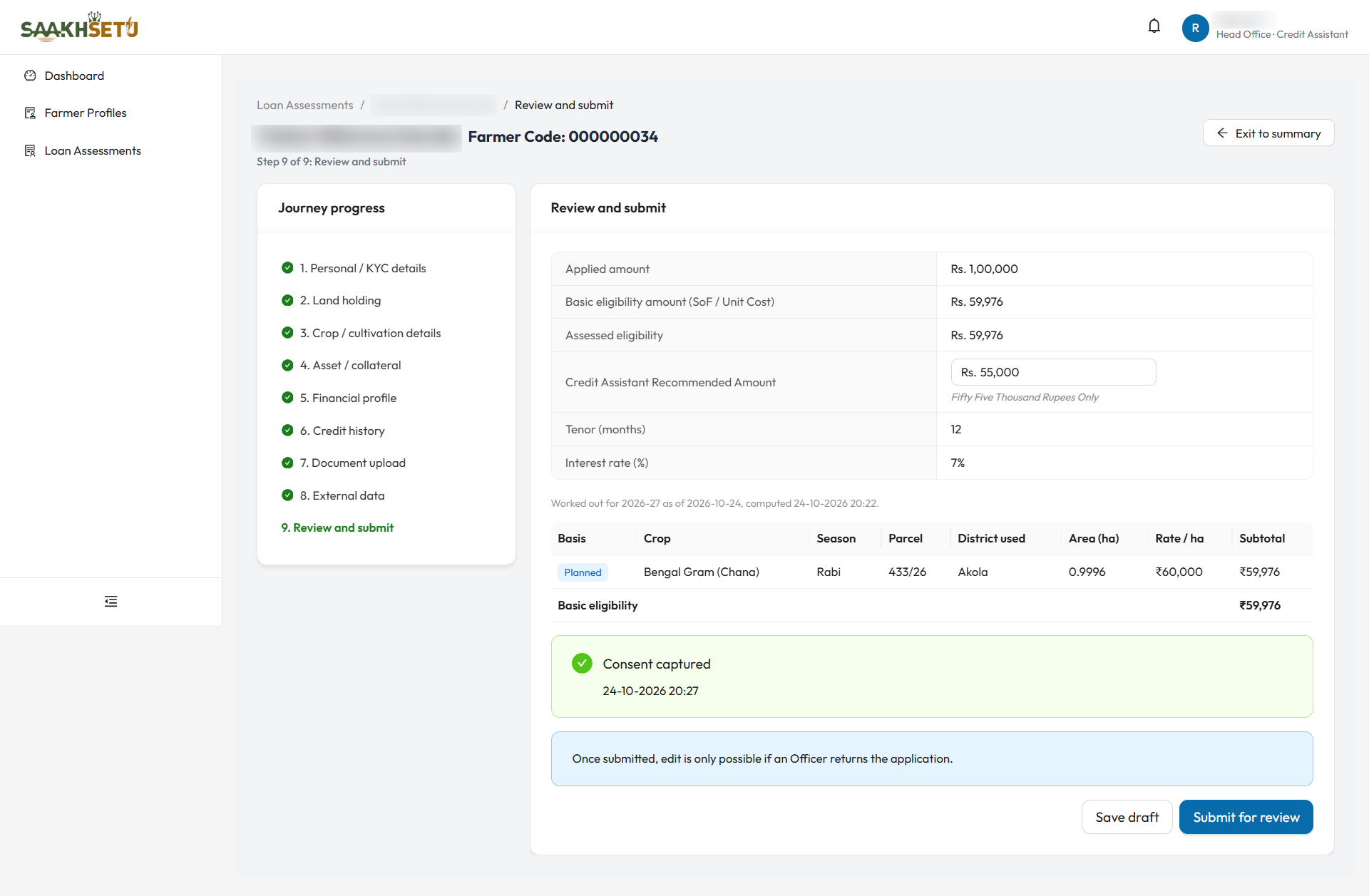
In this example, the Basic eligibility is worked out from one Planned crop, Consent captured is shown in green, and the Credit Assistant Recommended Amount is below the applied amount.
Summary table
| Row | Editable | Meaning |
|---|---|---|
| Applied amount | No | What the farmer asked for |
| Basic eligibility amount (SoF / Unit Cost) | No | From the eligibility step |
| Assessed eligibility | No | From the eligibility step |
| Credit Assistant Recommended Amount | Yes | The amount you recommend. Required. Cannot exceed the Applied amount |
| Tenor (months), Interest rate (%) | No | From the application |
Alerts to clear
| Alert | What to do |
|---|---|
| Consent not recorded | Select Capture consent. See 3.5 |
| Land parcel location missing | Capture a pin point or boundary for each listed parcel in Geo Location |
| Capture incomplete | Finish the listed steps |
| The eligibility is out of date | Recalculate |
The info line Once submitted, edit is only possible if an Officer returns the application. is always shown.
Buttons
| Button | What it does |
|---|---|
| Save draft | Saves the Recommended Amount and returns to the summary. It does not submit |
| Submit for review | Opens the submission dialog. Disabled until every alert above is cleared |
Submit
- Enter the Credit Assistant Recommended Amount.
- Select Submit for review.
- Optionally, choose a Credit Officer from your branch, and add Notes for the Credit Officer.
- Select Submit for review in the dialog.
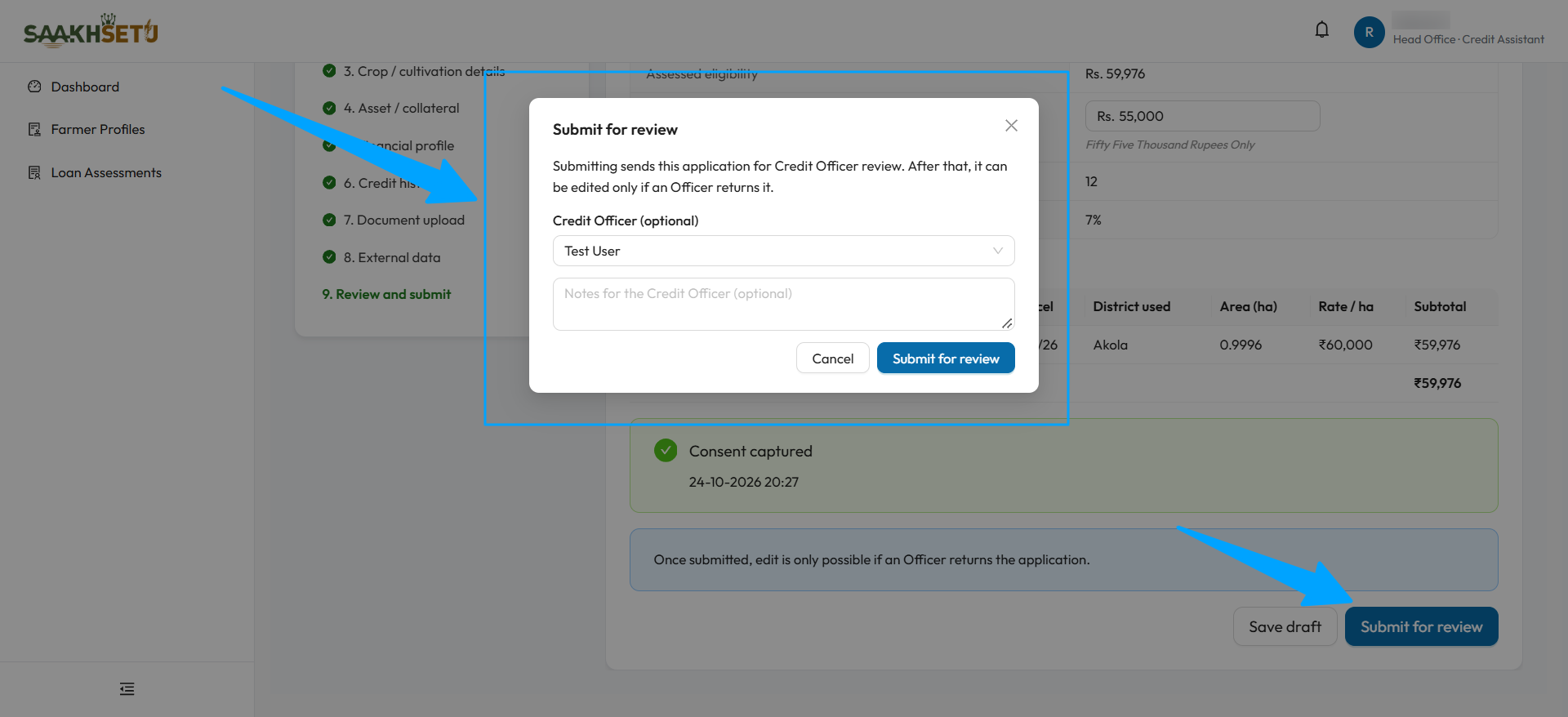
The arrows point to the Submit for review window and to the button that opens it.
SaakhSetu checks, in order:
| Check | If it fails |
|---|---|
| Nobody else changed the assessment meanwhile | This assessment was changed by someone else. Please reload and try again. |
| Recommended Amount entered, and not above Applied | Recommended Amount is required before submission. |
| Consent recorded | Consent must be captured before this assessment can be submitted. |
| Every active parcel has a location | The parcels without one are listed |
| Every required step completed | Not all required steps are complete. |
| Every required document uploaded or waived | The missing document types are listed |
| Eligibility still matches today's data | The basic eligibility amount has changed since it was last calculated. Recalculate eligibility, then submit again. |
After submission
The Application submitted for review screen shows:
| Item | Meaning |
|---|---|
| Application ID | An 8-digit number, unique in your bank, e.g. 00000042. Kept for the life of the application, including corrections |
| Credit Officer | Assigned, or Not assigned yet |
You then pass through two short checkpoints, External data and Scoring readiness, selecting Continue on each. Finally, choose View assessment or Start another.
What happened behind the scenes:
- The revision was frozen, and a submission manifest was created (reference MF-year-number). This exact snapshot is what gets scored.
- The status became SUBMITTED, or RESUBMITTED for a correction.
- If you chose an officer, the status moves to UNDER_REVIEW.
If the officer assignment fails
The submission still stands. You see Submitted, but the Credit Officer could not be assigned. Assign one from the Ownership panel on the summary. See 3.7.