3.9 Yogyank Score
WhoCredit Officer (generate); everyone with score.view (read)
WhereAssessment summary › Yogyank Score card
Permissionscore.view to see. score.trigger to generate
Yogyank is SaakhSetu's explainable entitlement score. It is calculated from the data exactly as it was submitted, never from live data, so the same submission always gives the same score. The score supports the bank's decision. It never approves or rejects a loan.
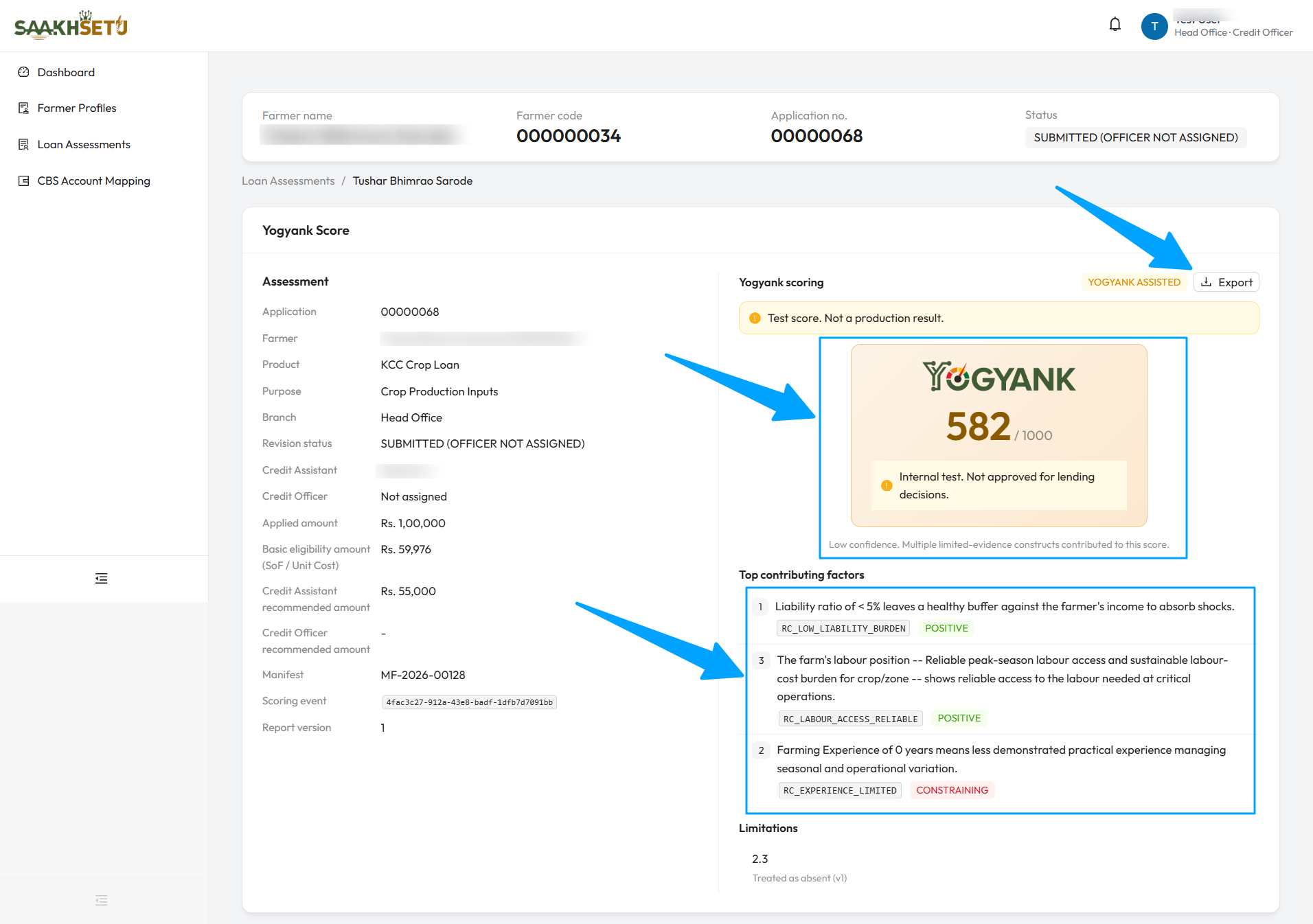
The arrows point to Export, the score, and the Top contributing factors. This example is an internal test score, so it carries the Internal test. Not approved for lending decisions. banner and the Low confidence line. Each factor shows its reason code and whether it is Positive or Constraining.
Generate the score
- Check the scoring readiness result.
- On the Yogyank Score card, select Generate Yogyank Score.
- Confirm with Generate score. The badge shows PROCESSING while it runs.
- When it finishes, the score and report appear, and the lender policy evaluation runs automatically.
| Rule | Detail |
|---|---|
| One score per revision | Only one completed, non-test initial score is allowed per revision. A second attempt shows A score already exists for this revision. |
| Submitted revisions only | A draft or returned revision cannot be scored |
| Decided applications | Once sanctioned or declined, an application can no longer be scored |
| Failure | If a run fails, select Retry as a new request |
The status badge
| Badge | Meaning |
|---|---|
| Not scored | No score yet |
| Processing | Scoring is running |
| Yogyank Assisted | A score is available to assist the decision |
| Synthetic Assisted / gold Yogyank Assisted | Based on an internal test score. Not for real lending |
| Readiness Blocked and other reasons | No score can assist this decision. The decision is rule-based only |
Decision support modes
| Mode | What it means for the officer |
|---|---|
| Yogyank Assisted | The score and its report are shown. The officer must open the report before recording a recommendation |
| Rule-based only | No score can be used. The decision rests on the transparent eligibility figures and the lender policy. The card explains why under Yogyank is not available to assist this decision |
Common reasons Yogyank is not available:
| Reason | Meaning |
|---|---|
| Readiness blocked | The application does not meet readiness requirements |
| Model unavailable | No active Yogyank model covers this assessment |
| Product not supported | The loan product is outside every model's scope |
| Engine failed | A technical failure. Retry |
| Shadow deployment | The model is running in shadow mode, and its value cannot inform a decision |
| Test score only | Only an internal test score exists |
Select View reason detail to see every reason that applies and which one takes precedence.
Reading the score report
| Part | Meaning |
|---|---|
| Entitlement Score | The score, e.g. 712 / 1000, with the model version and deployment scope |
| Evidence confidence | High: no limited-evidence constructs contributed. Medium: one did. Low: several did |
| Top contributing factors | The factors that most affected the score, marked Positive or Constraining |
| Limitations | Features treated as absent, and how they were treated |
| Banner | Meaning |
|---|---|
| Internal test. Not approved for lending decisions. | A research or test score. Never use it for a real decision |
| Score value withheld | The score cannot currently be disclosed, e.g. in shadow deployment |
| Historical report: model deployment deactivated | The model has since been withdrawn. The report is kept for reference only |
| Report generation pending | The explanation report is still being prepared |
Report actions
| Button | What it does | Permission |
|---|---|---|
| Export | Opens a PDF of the report in a new tab, watermarked SAAKHSETU CONFIDENTIAL with your name and the time | score.view |
| Regenerate | Creates a new report version. The previous one is kept as Superseded | score.technical.inspect |
| View technical detail | A restricted view for audit and model-review staff, with the technical details behind the score | score.technical.inspect |
When more than one report version exists, a Report versions card lists them, and you can open or export any earlier version.
Treat exported reports as confidential
A score report contains the farmer's personal and financial information. Share it only through the bank's approved channels.