3.4 Documents & Waivers
WhoCredit Assistant (upload, request waiver), Credit Officer (verify, decide waiver)
WhereWizard › Documents step, and the Document Waivers panel on the summary
Permissionfarmer.update to upload. document.verify to review. document_waiver.request / document_waiver.decide for waivers
The Documents step lists the documents this application needs. The list comes from your bank's document requirements for the product and application type, fixed when the assessment was started.
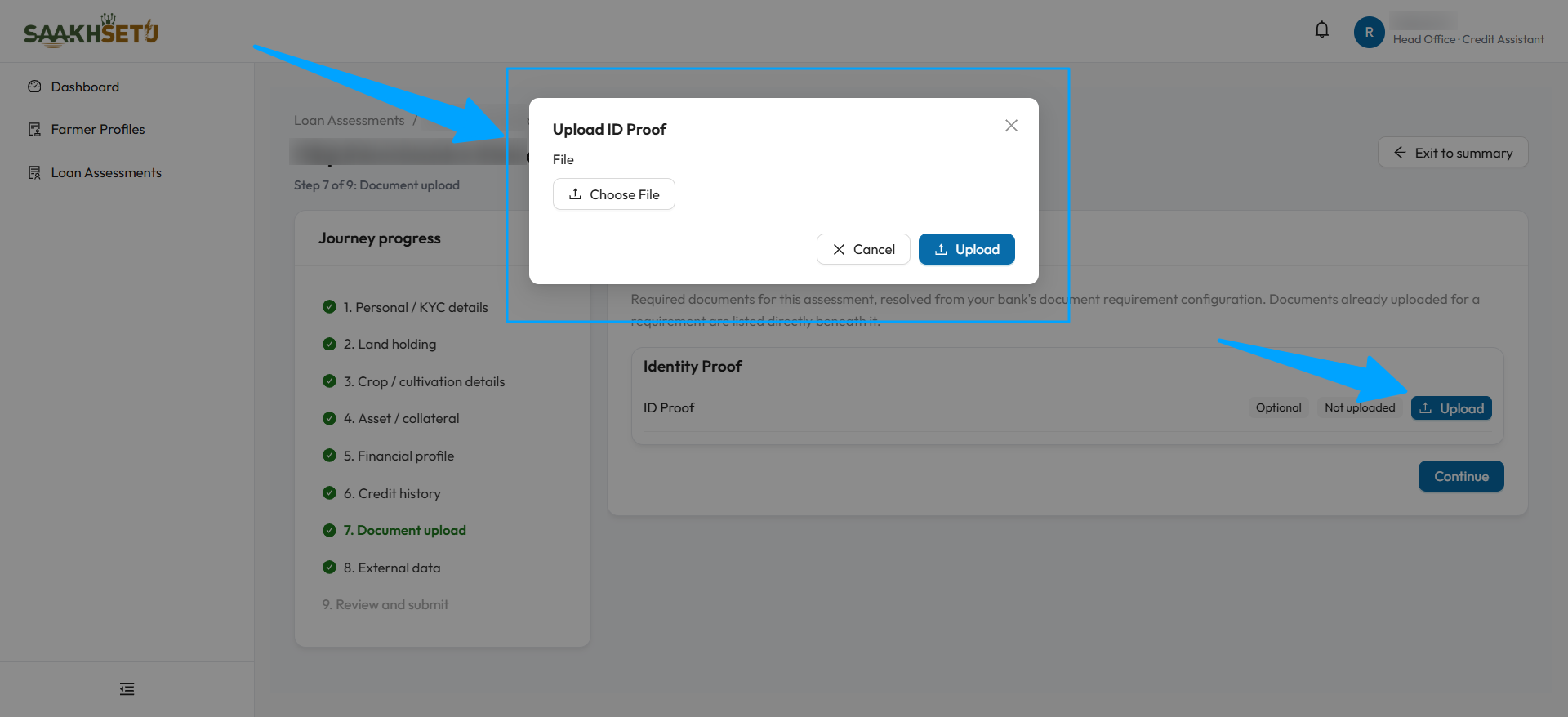
The arrows point to Upload on the requirement and to the Upload ID Proof window it opens. Here the document is tagged Optional and Not uploaded.
Reading the checklist
Requirements are grouped by category. Each row shows the document type and, on the right, its state:
| Element | Meaning |
|---|---|
| Required / Optional | Whether this application needs it |
| Not uploaded | Nothing uploaded yet |
| Pending verification Verified Rejected Expired | Status of the latest upload |
| Waived | An approved waiver covers this requirement |
| Upload / Re-upload | Upload the document, or a fresh copy if the latest is not verified |
| Review (shield icon) | For officers with document.verify: verify or reject the latest upload. See 2.10 |
| Request waiver | Ask for this document to be waived. Shown only for waivable documents |
Uploaded files are listed under each requirement, newest first, with View and Delete.
Upload a document
- Select Upload on the requirement.
- Choose the file, and the Expiry Date if this document type has one.
- Select Upload. You see Document uploaded.
The file is saved in the farmer's Documents tab and follows the same rules: PDF, JPG or PNG, up to 20 MB.
When can I continue?
Continue is enabled once every required document is covered. A requirement is covered by:
- an upload that is Pending verification or Verified, or
- a waiver that is requested (pending) or approved.
A Rejected or Expired upload does not count. Upload a fresh copy. A yellow warning lists any requirements that still need attention.
Verification can come later
Documents do not have to be verified before you submit. But a score can only be generated once required documents are verified or their waiver is approved. The Credit Officer handles this during review.
Waivers
Request a waiver when a farmer genuinely cannot produce a waivable document.
flowchart LR
    A[Credit Assistant<br/>requests waiver] --> B[Waiver requested]
    B -->|Application submitted<br/>and under review| C{Credit Officer decides}
    C -->|Approve| D[Waiver approved<br/>requirement covered]
    C -->|Deny| E[Application CANCELLED]
Request a waiver (Credit Assistant)
- Select Request waiver on the requirement.
- Explain why the document cannot be produced.
- Select Submit request. You see Waiver requested. A Credit Officer will review it.
| Rule | Detail |
|---|---|
| Waivable documents only | Your bank sets which documents are waivable |
| One pending request per document type | A second request cannot be made while one is pending |
| No re-request after a denial | Not in this version |
Decide a waiver (Credit Officer)
Waivers can only be decided after the application is submitted and under review. Before that, the buttons explain This waiver can only be decided once the application has been submitted and is under review.
- Approve: confirm Approve this waiver request? (or Self-approve… if you requested it yourself). The requirement is covered.
- Deny: enter the reason in Deny waiver request and select Confirm denial. The requester is notified.
Denying a waiver cancels the application
When a Credit Officer denies a waiver, the whole application is cancelled. It cannot continue. The requester receives an in-app notification with the reason. Be certain before you deny.
Document Waivers panel
The assessment summary shows a Document Waivers panel whenever waivers exist. Each waiver shows the document type, who requested it and when, its status (Pending Approved Denied), the reason, and who decided it.
Waivers do not carry forward
When an application is returned and a correction is started, earlier waivers no longer apply. Document requirements are checked afresh, and any waiver must be requested again.