2.3 The Farmer Profile & Core Profile Tab
WhoEveryone who views farmers
WhereFarmer Profiles › View
Permissionfarmer.view. Farming history needs farmer.update. Newness visit needs document.verify
Selecting View on a farmer opens the full profile. It has a header with the farmer's key facts and eight tabs, one for each part of the profile.
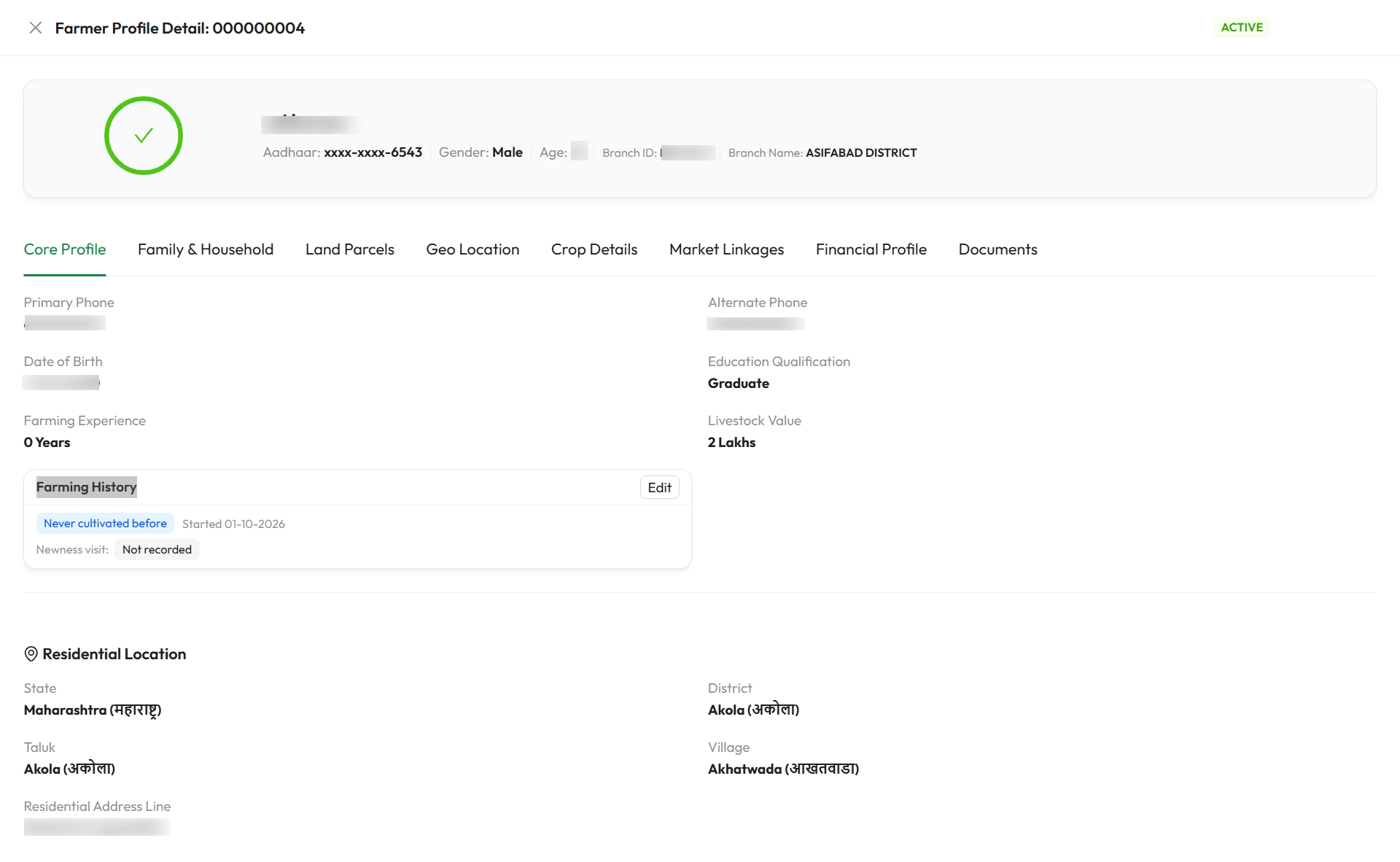
In this example, the Farming History card shows Never cultivated before with its start date, and the Newness visit is Not recorded.
Profile header
| Element | Meaning |
|---|---|
| Farmer Profile Detail: farmer code | The farmer code, or Pending for a draft |
| Active / Inactive | Profile status |
| Completeness ring | Profile completeness percentage. Turns green at 100% |
| Name | The farmer's full name |
| Aadhaar, Gender, Age | Masked Aadhaar (xxxx-xxxx-1234), gender, and age in whole years worked out from the date of birth |
| Branch ID, Branch Name | The branch the profile belongs to |
| Profile Inactive banner | Shown only for a deactivated profile, with the deactivation reason |
To change the core details, close the profile and use Edit on the registry row. See 2.2.
The eight tabs
| Tab | Holds | Guide page |
|---|---|---|
| Core Profile | Contact, education, experience, livestock value, residential location, farming history | This page |
| Family & Household | Family members and links to other registered farmers | 2.4 |
| Land Parcels | Land holdings, ownership, irrigation and soil | 2.5 |
| Geo Location | Map location and boundary of each parcel | 2.6 |
| Crop Details | Crops grown, planned and sold, irrigation and field visits | 2.7 |
| Market Linkages | Where and how the farmer sells produce | 2.8 |
| Financial Profile | Income, banking, existing loans, livestock, allied income, assets | 2.9 |
| Documents | Uploaded KYC, land, financial and insurance documents | 2.10 |
Core Profile tab
| Field | Shows |
|---|---|
| Primary Phone | Mobile Contact Number |
| Alternate Phone | Alternate Contact Number, or - |
| Date of Birth | Date of birth |
| Education Qualification | Education level |
| Farming Experience | Years of experience, e.g. 12 Years |
| Livestock Value | Value in lakhs, or - |
| Residential Location | State, District, Taluk, Village and Residential Address Line |
These values come from onboarding and are read-only here.
Farming history
The Farming History card records whether the farmer has farmed before. This matters for scoring: SaakhSetu treats a new farmer differently from an experienced one, and crop records dated before the farmer started are flagged as inconsistent.
| Card element | Meaning |
|---|---|
| Status tag | The recorded status in blue, or Not recorded. Hover over it to see when it was recorded |
| Started {date} | The cultivation start date, for farmers who started recently or never cultivated |
| Record / Edit | Opens the Farming history dialog. Hidden for inactive profiles and for users without farmer.update |
Record farming history
- On the Farming History card, select Record (or Edit).
- Choose the Status that matches the farmer.
- For Started cultivating recently, pick the start date. For Never cultivated before, you may pick one.
- Select Save. You see Farming history saved.
| Status option | When to choose it | What it does |
|---|---|---|
| Farming history recorded | The farmer has farmed before and you will enter their crop history | Default |
| Started cultivating recently | The farmer began farming recently | Started cultivating on is required. Crops recorded before that date are flagged, and Experience cannot exceed the whole years since that date |
| Never cultivated before | The farmer has never farmed | Sets Experience to 0 and locks it. Earlier crops are flagged. Requires a newness field visit and a bureau check before scoring |
| Farmed before, records unavailable | The farmer has farmed, but has no records | Declared history can still be entered |
| Field | Required | Rules |
|---|---|---|
| Started cultivating on | Yes for Started cultivating recently. Optional for Never cultivated before (today is used if left blank) | Cannot be in the future |
Crops before the start date
If the farmer already has crop records dated before the start date, saving shows Farming history saved. Some crops are recorded before the start date. The card lists each affected crop with Before the declared farming start date. Correct either the start date or the crop record.
Newness visit
Shown only for farmers who started recently or never cultivated. A farmer new to cultivation needs a newness visit, a local enquiry confirming they have not farmed before, plus a verified bureau check, before they can be scored.
| Element | Meaning |
|---|---|
| No prior cultivation found | The latest visit confirmed the farmer is new |
| Prior cultivation found | The latest visit found the farmer has farmed before. Review the farming history |
| Not recorded | No visit yet |
| Record / Record a new visit | Records a visit. Needs document.verify |
| Field | Required | What to enter | Rules |
|---|---|---|---|
| Visit date | Yes | When the enquiry took place | Cannot be in the future |
| Outcome | Yes | No prior cultivation found or Prior cultivation found | |
| Notes | No | Who you spoke to and what they said | Up to 2,000 characters |
Select Record. You see Newness visit recorded. A new visit replaces the earlier one for decisions, but the earlier visit is kept as history. Visits are never edited.