1.10 Customize Branding
WhoBank Admin
WhereSidebar › Customize Branding
Permissiontenant.branding.manage
Screen titleBranding Console
Branding lets SaakhSetu carry your bank's identity: your logo in the header, and your primary and accent colours on buttons, highlights and selected menu items. It is cosmetic only and has no effect on data, permissions or workflow. Changes apply to every user in your bank.
The screen
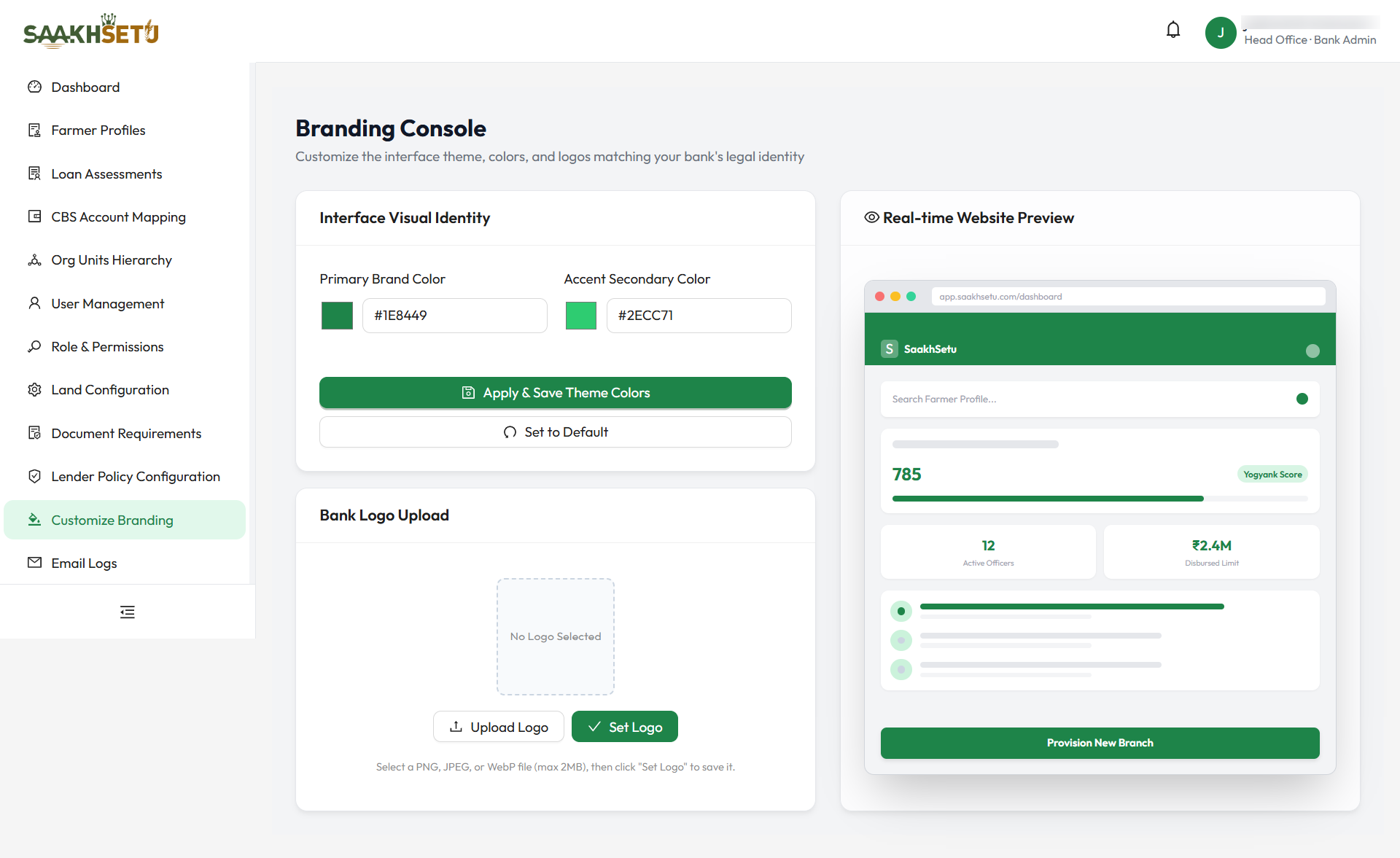
| Panel | Purpose |
|---|---|
| Interface Visual Identity | Choose and save the theme colours |
| Bank Logo Upload | Choose, save or remove the logo |
| Real-time Website Preview | A mock SaakhSetu screen that updates as you edit, so you can check the look before saving. It shows sample figures only |
Change the theme colours
- In Primary Brand Color, pick a colour with the colour swatch, or type a hex code such as
#1e8449. - Do the same for Accent Secondary Color.
- Check the Real-time Website Preview.
- Select Apply & Save Theme Colors. You see Branding colors updated successfully!
| Field | Required | What it controls | Format |
|---|---|---|---|
| Primary Brand Color | Yes | Buttons, the avatar, selected items and headline numbers | Hex colour: # followed by 6 characters (0–9, A–F), e.g. #0b5394 |
| Accent Secondary Color | Yes | Soft highlights, badges and backgrounds | Same format |
Set to Default restores the SaakhSetu colours (primary #1e8449, accent #2ecc71) in the editor. Select Apply & Save Theme Colors to keep them.
Keep text readable
White text is shown on the primary colour, so choose a primary colour dark enough for white text to stand out. Very light primary colours make buttons hard to read.
Upload or change the logo
- In Bank Logo Upload, select Upload Logo and choose the image file.
- The image appears in the preview box with a coloured border. It is not saved yet.
- Select Set Logo to save it. You see Bank logo uploaded successfully!, and the logo appears in the header for everyone.
| File rule | Limit |
|---|---|
| Format | PNG, JPEG or WebP image |
| Size | Up to 2 MB. Larger files are refused with File size exceeds 2MB limit. |
Best logo results
Use a wide (landscape) logo on a transparent or white background. The header shows the logo about 36 pixels tall and up to about 170 pixels wide.
Remove the logo
| Situation | What Remove Logo does |
|---|---|
| You picked a new file but have not selected Set Logo | Discards the new file. The saved logo stays |
| A logo is saved | Deletes it after you select the button. You see Branding logo removed. Default logo will be used., and the SaakhSetu logo shows instead |