3.5 Farmer Consent
WhoCredit Assistant (or Credit Officer)
WhereWizard › Review and submit › Capture consent, or the summary's Consent row
Permissionassessment.consent_manage
RequiredBefore submission, parcel location capture, external data and scoring
Under the DPDP Act, the farmer must consent for this specific application before the bank collects their data, fetches external data or produces a score. Consent is captured once per assessment, by one of two methods.
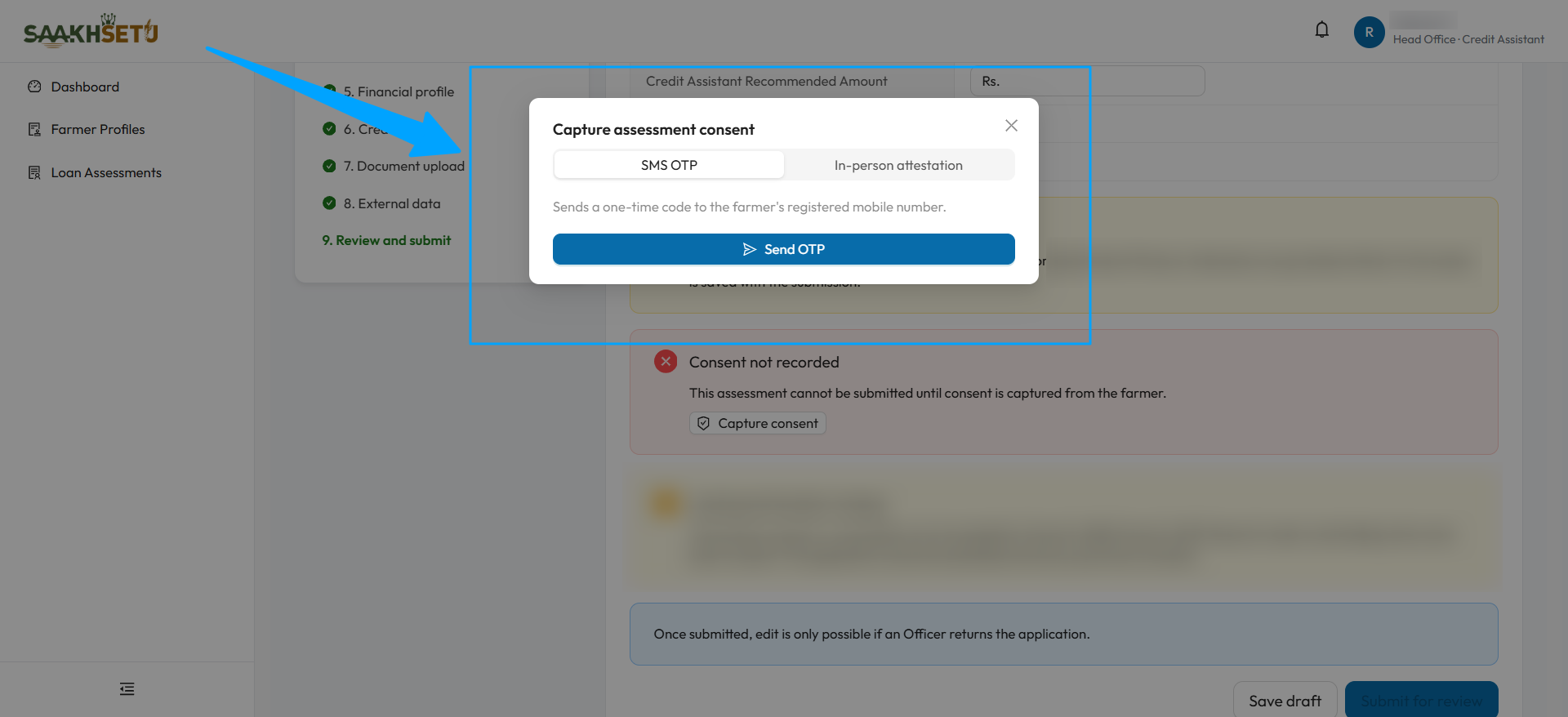
The window opens from Capture consent. Behind it, the red Consent not recorded message shows that the application cannot be submitted yet.
Method 1 · SMS OTP
- Select Capture consent. Capture assessment consent opens with SMS OTP selected.
- Select Send OTP. A 6-digit code is sent to the farmer's Primary Phone, shown masked, e.g. xxxxxx0001.
- The farmer receives an SMS with the code and a link to a page explaining the consent.
- Ask the farmer for the code and enter it in 6-digit OTP code.
- Select Verify & record consent. You see Consent recorded.
| Rule | Detail |
|---|---|
| Validity | Each code is valid for 10 minutes |
| Attempts | 3 wrong attempts per code. After that, select Resend OTP or Attest in person |
| Resend | Resend OTP sends a new code and resets the attempts |
Delivery messages:
| Message | Meaning and action |
|---|---|
| OTP sent to … | The SMS was sent |
| The OTP SMS could not be sent | The code was generated but the SMS failed. Resend it, or use in-person attestation |
| SMS delivery could not be confirmed | Ask the farmer to check their messages. Resend, or attest in person |
| Test mode: OTP generated, no SMS sent | A test environment. The consent is marked Test consent |
What the farmer sees
The SMS link opens a mobile-friendly page, with no login needed, that explains:
- What this consent is for: the loan application with your bank, and the Yogyank score that supports the bank's review.
- What information is covered: the steps of this application's journey.
- How the information is used: only for this application. SaakhSetu does not approve or reject the loan. The final lending decision is made by the bank.
- How long the information is kept, and who to contact at the bank.
The farmer gives consent by telling you the code. The page itself has no consent button.
Method 2 · In-person attestation
Use this when the farmer cannot receive an SMS.
- In Capture assessment consent, choose In-person attestation.
- Have the farmer sign the bank's consent form, and scan or photograph it.
- Select Choose signed consent form and pick the file.
- Optionally, add a Note.
- Select Record consent.
| Field | Required | Rules |
|---|---|---|
| Signed consent form | Yes | PDF, JPG or PNG, up to 20 MB |
| Note | No | e.g. where and with whom the form was signed |
After consent
- The summary's Consent row shows Recorded with the date and time (or Test consent in a test environment).
- Consent is final. It cannot be captured twice for the same assessment.
- The full application view shows a Consent trace: method, who recorded it and when, and the OTP delivery result.
No consent, no score
Without consent the assessment cannot be submitted. If it was submitted earlier without consent, external data and scoring stay blocked: Consent not recorded, not scoring eligible.