2.8 Market Linkages
WhoCredit Assistant
WhereFarmer profile › Market Linkages tab
Permissionfarmer.update
Before you startThe crop being sold must exist in Crop Details
Market Linkages records how and where the farmer sells produce: their usual sales channel, each individual sale, and how declared sales compare with declared income.
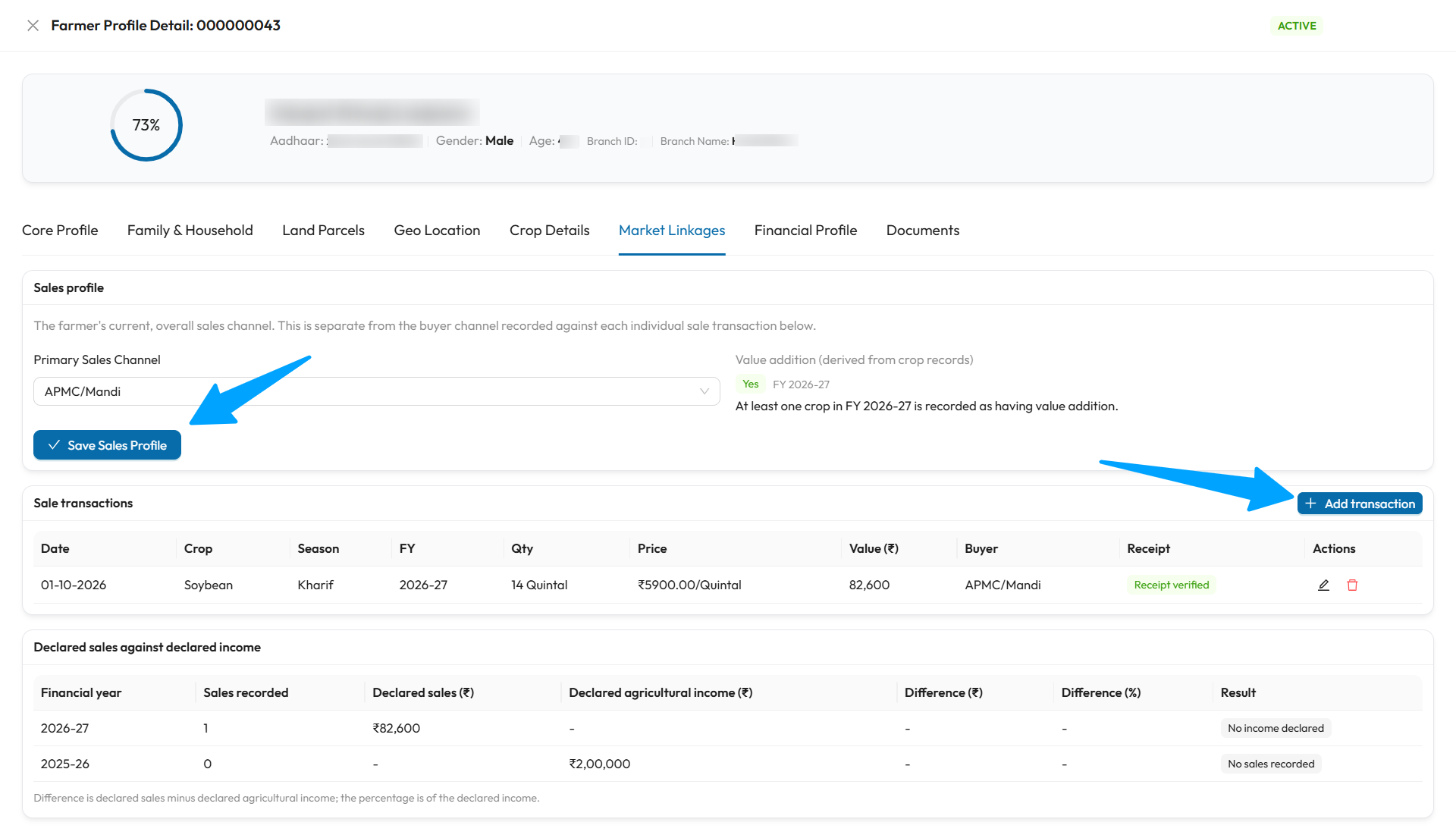
The arrows point to Save Sales Profile and Add transaction. In this example, the sale shows Receipt verified, and the comparison table shows No income declared for 2026-27, because income was recorded only for 2025-26, which in turn shows No sales recorded.
Sales profile
The farmer's current, overall sales channel. It is separate from the channel recorded against each individual sale.
| Field | Required | What to enter |
|---|---|---|
| Primary Sales Channel | No | Contract Buyer, FPO/Cooperative, APMC/Mandi or Local Trader |
| FPO Membership ID | Yes, for FPO/Cooperative | The farmer's FPO or cooperative membership ID. Up to 50 characters |
| Value addition (derived from crop records) | Read-only | Worked out from the value-addition answers on each crop. See below |
Select Save Sales Profile.
Value addition (derived)
| Tag | Meaning |
|---|---|
| Yes | At least one crop that year is recorded with value addition |
| No | The year is confirmed complete in Crop Details and every crop says No |
| Unresolved | A crop has no answer, or the year's crop list is not confirmed complete, so No cannot be concluded |
To change it, answer the value-addition question on each crop in Crop Details.
Sale transactions
Select Add transaction to record a sale.
| Field | Required | What to enter | Rules |
|---|---|---|---|
| Crop Record | Yes | The crop this sale is for, shown as crop · season year (Parcel survey no.) | Fills in Crop Category, Crop Name, Fiscal Year and Season automatically |
| Sale Date | Yes | When the sale happened | Not in the future |
| Sale Channel | Yes | Contract Buyer, FPO/Cooperative, APMC/Mandi or Local Trader | |
| FPO Membership ID | No | For FPO sales | Up to 50 characters |
| Quantity Sold | Yes | Amount sold, with its Unit | Total sales for a crop cannot exceed its yield × area |
| Unit Price (₹) | Yes | Price per unit | 0 or more |
| Buyer Name | No | The buyer | Letters, spaces, full stops, apostrophes and hyphens only. Up to 150 characters |
Select Save Transaction. A crop can have several sales. Recording a sale marks that crop Sold in Crop Details, and removing its last sale clears that status.
Receipts
The Receipt column shows whether a sale is backed by a receipt document:
| Tag | Meaning |
|---|---|
| Receipt verified | A linked receipt was verified |
| Receipt pending | A receipt is linked, but not yet verified |
| Receipt rejected/expired | The only linked receipt was rejected or has expired |
| No receipt | No receipt is linked |
Linking a receipt
Receipts are linked from the Documents tab, not from here. Upload a Sale Receipt or J-Form/Sale Slip and choose the sale under Link to. See 2.10 Documents. Each sale needs its own receipt.
Declared sales against declared income
This card compares, for each financial year, the total declared sales with the agricultural income declared in the Financial Profile.
| Column | Meaning |
|---|---|
| Sales recorded | Number of sales that year |
| Declared sales (₹) | Total of quantity × price |
| Declared agricultural income (₹) | From Annual Income |
| Difference (₹), Difference (%) | Sales minus income, and that difference as a percentage of income |
| Result | Matches, Sales above income, Sales below income, No income declared or No sales recorded |
Exact match only
Matches means the two figures are exactly equal. Any difference is shown, so that the reviewing officer can judge whether it is reasonable.