3.3 The Assessment Wizard
WhoCredit Assistant
WhereOpens after Start assessment, or via Resume on a draft
Permissionassessment.update
The wizard walks you through each step of the assessment's journey. Most steps show the same forms as the farmer's profile (Module 2), so anything you enter here is saved to the farmer's profile and is visible everywhere.
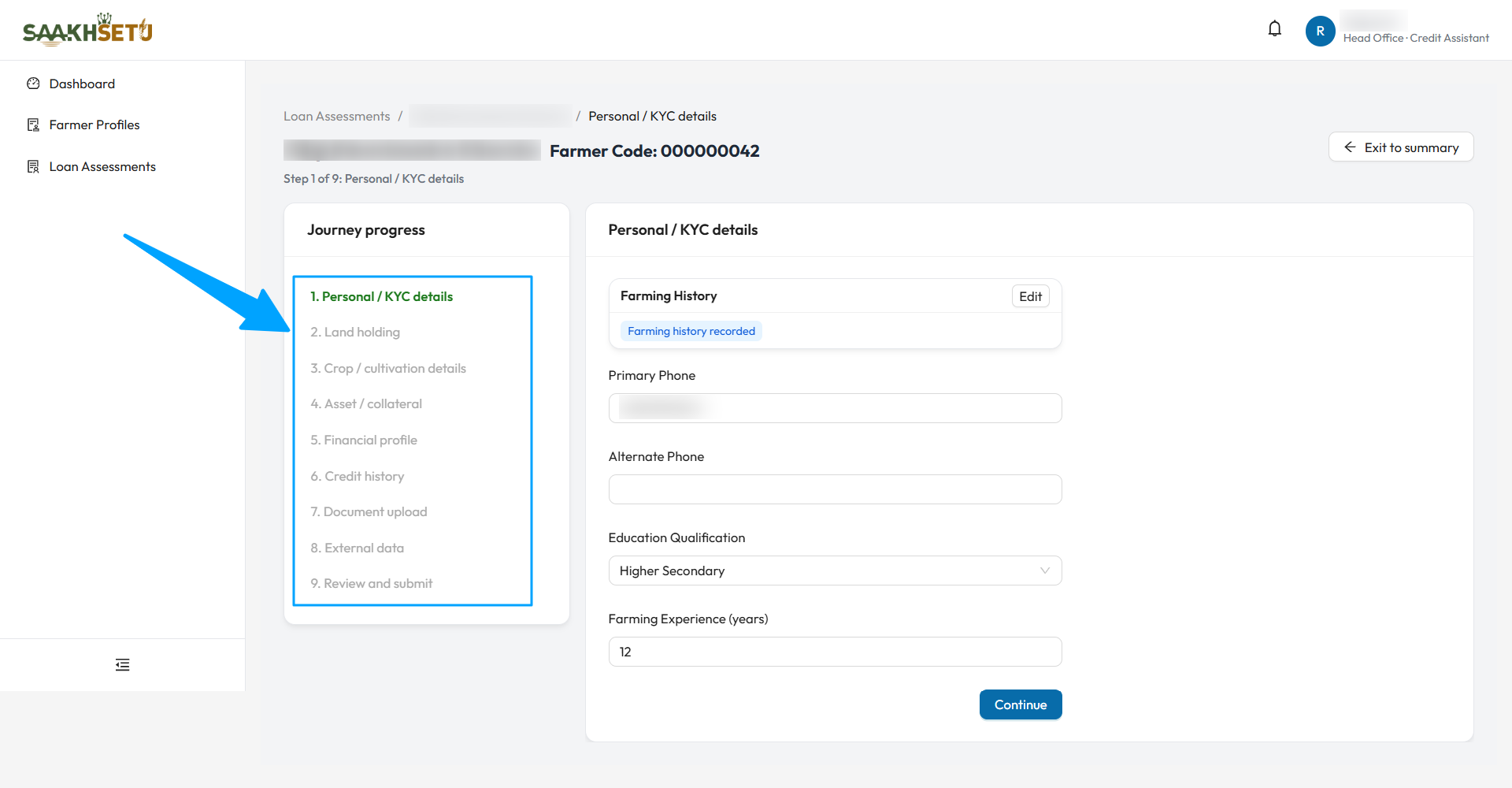
The arrow points to Journey progress. This example journey has nine steps, from Personal / KYC details to Review and submit. Your bank's journey may have different steps.
Layout and navigation
| Element | Meaning |
|---|---|
| Breadcrumb | Loan Assessments › farmer name › current step |
| Heading | Farmer name, Farmer Code, and Step n of N: step name |
| Journey progress (left) | Every step in order. A green tick means completed, a grey dash means skipped, and the current step is shown in bold |
| Exit to summary | Leaves the wizard. Everything you saved is kept |
| Continue | Marks the current step complete and moves to the next |
- The wizard opens at the first unfinished step.
- You can click back to any earlier step. You cannot jump past the first unfinished step: Complete the current step before jumping ahead.
- Data inside a step (a parcel, a loan, a document) is saved by that form's own Save button the moment you save it. Continue only marks the step complete.
- Once the assessment is submitted, the wizard closes and you are taken to the summary.
SaakhSetu checks each step before marking it complete
Continue is refused if the step's minimum data is missing. The message names the step and what is missing, for example 'Land holding' cannot be marked complete yet: Add at least one land parcel for this farmer before continuing.
Step reference
Your journey includes some or all of these steps, in the order your bank's product defines.
| Step | What you do | Minimum to continue | Field details |
|---|---|---|---|
| Personal / KYC details | Confirm phone numbers, education and farming experience. Record farming history (and a newness visit if needed) | Education and farming experience filled in | 2.2, 2.3 |
| Family / household details | Add family members and household links | At least one family member | 2.4 |
| Land holding | Add the farmer's parcels, with cultivation continuity | At least one active parcel | 2.5 |
| Crop / cultivation details | Record crops, planned crops or a fallow year | A crop record, a planned crop, or the year marked fallow | 2.7 |
| Financial profile | Banking details and annual income | A complete average-monthly-balance record for a full fiscal year (1 April to 31 March), and an income record for the same year | 2.9 |
| Credit history | Existing loans and default events, or the no-prior-credit declaration | At least one loan, or a verified no-prior-credit declaration | 2.9 |
| Asset / collateral | Mechanisation access, machinery, livestock | Mechanisation access recorded: No mechanisation access, or Access evidence recorded with at least one machine | 2.9 |
| Documents / Document upload | The document checklist | Every required document uploaded or waived | 3.4 |
| External data | Soil health evidence for each parcel | Nothing mandatory | 2.5 |
| Eligibility calculation | See and recompute eligibility figures | Figures calculated, or a known reason they cannot be | 3.6 |
| Review and submit | Recommended amount, consent and submission | Every other step completed | 3.6 |
Some journeys also include these steps:
| Step | Purpose |
|---|---|
| Review profile | Read-only check of the farmer's personal, land and crop details, with links to edit them |
| Repayment history | Read-only list of own-bank and other-bank loans. An empty history is not treated as negative |
| Cultivation changes | The Crop Details screen, for changes this cycle |
| Financial update | The Financial profile sections, for a renewal |
| Enhancement details | Placeholder for enhanced-limit renewals. Its fields are not yet defined |
Step notes
Personal / KYC details. The Primary Phone here is the number the consent OTP is sent to. Make sure it is the farmer's own mobile.
Land holding. A parcel added in this step takes the farmer's residential location. To use a different village, add the parcel from the farmer's Land Parcels tab instead.
Every parcel needs a location before submission
The application cannot be submitted until every active parcel has a pin point or boundary. The wizard's Land holding step does not capture location: capture it in the farmer's Geo Location tab, after consent is recorded.
Credit history. The Credit status tag shows Existing credit, No prior formal credit or Not yet established. A declaration that is not yet verified does not complete this step. An officer must verify it first.
External data. This step shows an Optional tag and a Skip step button. Use Continue instead: submission requires every required step to be completed, and External data is required in every journey. A skipped step stops submission until you reopen it and select Continue.