3.1 Loan Assessments List
WhoEveryone who works on assessments
WhereSidebar › Loan Assessments
Permissionassessment.view, plus a scope permission (see below)
The Loan Assessments list is the work queue for every application you can see.
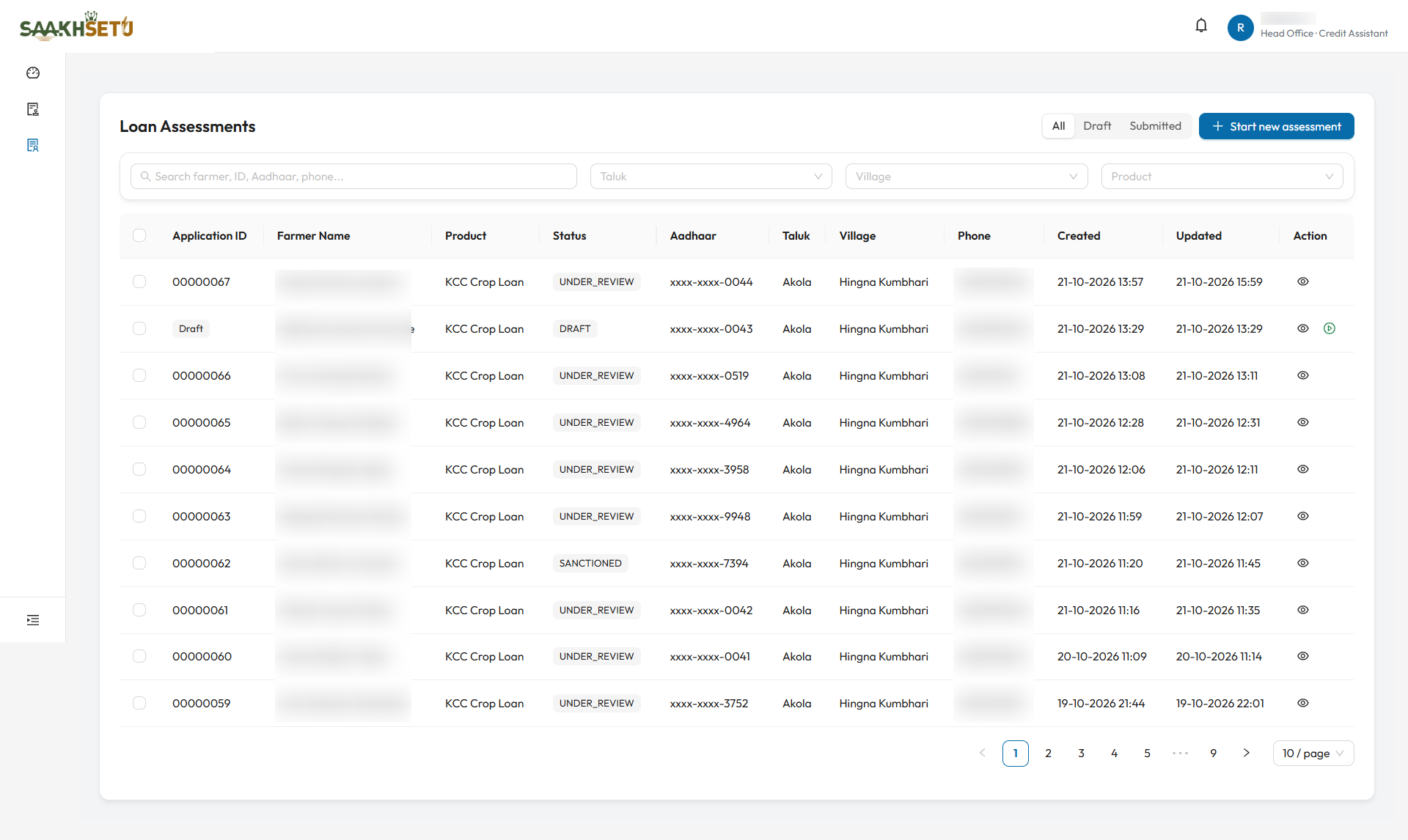
The Status column shows where each application is, for example DRAFT, UNDER_REVIEW and SANCTIONED. A draft shows the Resume (play) icon next to View.
Which assessments you see
| Your permission | You see |
|---|---|
assessment.view_assigned |
Assessments where you are the assigned Credit Assistant or Credit Officer |
assessment.view_branch_queue |
Every assessment serviced by your branch |
assessment.view_tenant |
Every assessment in the bank |
Credit Officers do not see assessments that are still in DRAFT. Those belong to the Credit Assistant until they are submitted. The list is sorted by last updated, newest first.
Filters and search
| Control | What it does |
|---|---|
| All / Draft / Submitted | Draft shows applications still being prepared. Submitted shows everything submitted at least once, whatever its stage now |
| Start new assessment | Starts a new application. See 3.2. Needs assessment.create |
| Search | Matches farmer name, Application ID, Aadhaar last 4 digits, phone, village or taluk |
| Taluk, Village, Product | Narrow by location or loan product. Only values present in your list are offered |
Table
| Column | Meaning |
|---|---|
| Application ID | The 8-digit application number, given at first submission. Shows Draft until then |
| Farmer Name, Product | Who is applying, and for what |
| Status | See Assessment statuses |
| Aadhaar | Masked, last 4 digits only |
| Taluk, Village, Phone | Farmer details |
| Created, Updated | Timestamps |
| Action | View (eye icon) opens the summary. Resume (play icon) reopens the wizard, for drafts only, with assessment.update |
Bulk assignment
Select several rows with their tick boxes. A bar appears with:
| Button | What it does |
|---|---|
| Bulk assign Credit Assistant | Assigns one Credit Assistant to every selected assessment |
| Bulk submit to Credit Officer | Assigns one Credit Officer to every selected assessment |
| Clear selection | Unticks all rows |
- Tick the assessments and choose a bulk action.
- Select the person. Only active users whose role is eligible for that seat are listed.
- Enter a Reason, which is required.
- Select Confirm assignment.
Each assessment is processed on its own. The result shows how many succeeded and failed, with a Failed assignments list explaining each failure. A typical cause is that the user does not belong to that assessment's branch.
Bulk submit only assigns
Despite its name, Bulk submit to Credit Officer only assigns the officer. It does not submit draft applications: each draft must still be submitted from its own Review and submit step. Assigning an officer to an already-submitted assessment moves it to UNDER_REVIEW.
| Who may assign | Credit Assistant seat | Credit Officer seat |
|---|---|---|
| Bank Admin | Any assessment | Any assessment |
| Organization Admin | Own branch | Own branch |
| Credit Officer | Own branch | |
| Credit Assistant assigned to the case | That assessment |
Up to 200 assessments can be assigned in one go.