2.4 Family & Household
WhoCredit Assistant
WhereOnboarding Step 3, or the profile's Family & Household tab
Permissionfarmer.update, on an active profile
A farmer's household is recorded in two different ways:
| Family Members | Household Links | |
|---|---|---|
| Use for | Relatives who are not registered in SaakhSetu | Relatives who are registered farmers in your bank |
| Stored as | Name, age and relationship, typed in | A link between two farmer profiles |
| Mirrored on the other person | No | Yes, automatically |
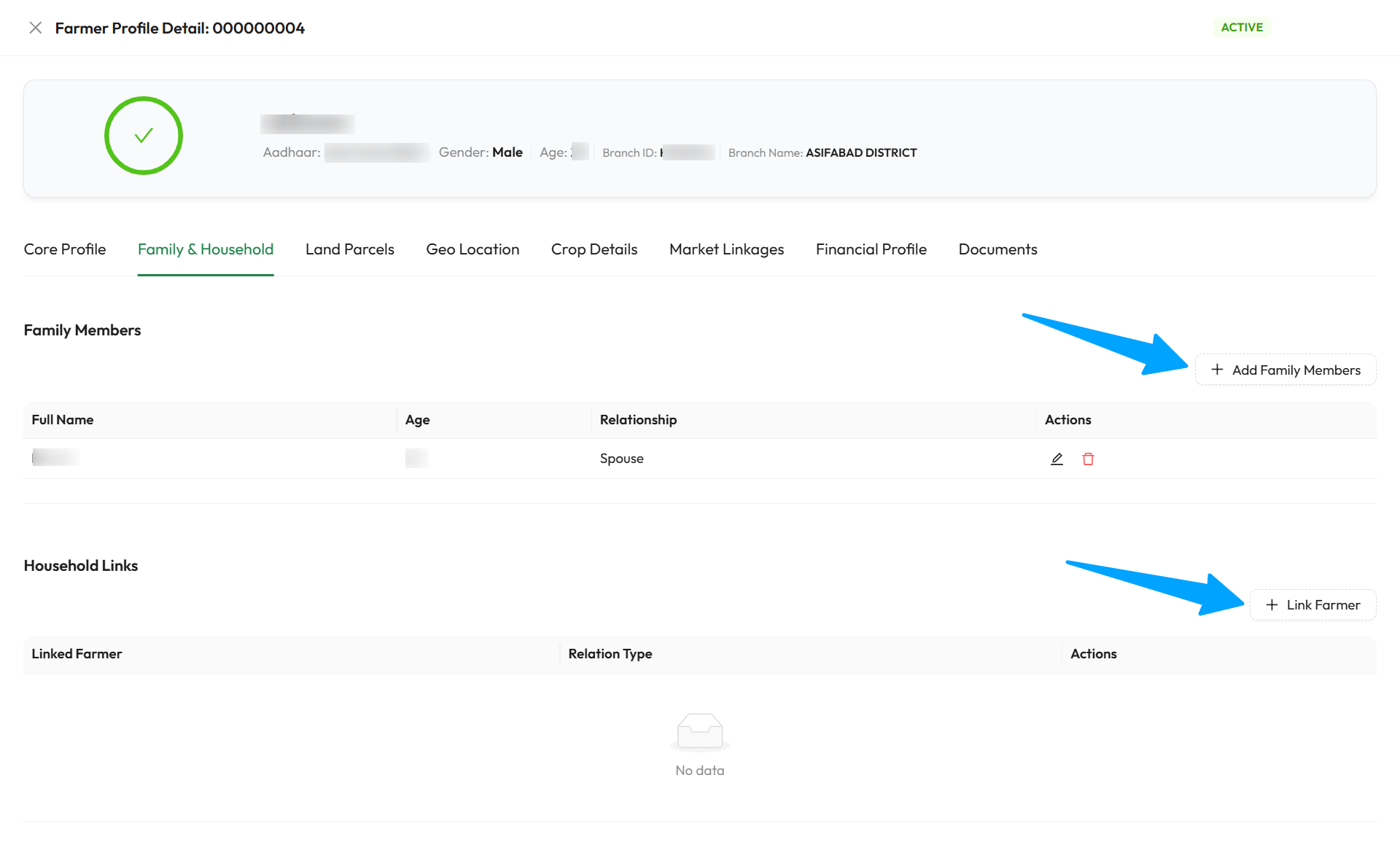
The arrows point to Add Family Members and Link Farmer. The pencil and bin icons on a row edit or delete that entry.
Family members
- Select Add Family Members (on the tab) or + Add Family Member (in onboarding Step 3).
- Fill in the fields below and select Save. You see Family member saved.
| Field | Required | What to enter | Rules |
|---|---|---|---|
| Full Name | Yes | The family member's name | Up to 150 characters |
| Age | Yes | Age in years | Whole number, 0 or more |
| Relationship | Yes | How they relate to the farmer | One of: Spouse, Father, Mother, Son, Daughter, Brother, Sister, Grandfather, Grandmother, Grandson, Granddaughter, Father-in-law, Mother-in-law, Son-in-law, Daughter-in-law, Brother-in-law, Sister-in-law, Uncle, Aunt, Cousin, Nephew, Niece |
Use the edit (pencil) icon to change a member, or the delete (bin) icon to remove one after confirming Delete family member?.
Household links
Link the farmer to another farmer already registered and completed in SaakhSetu, for example a father who is also a borrower.
- Select Link Farmer (on the tab) or + Link Farmer (in onboarding Step 3).
- In Search Farmer, type at least 4 characters of the other farmer's name, phone number, farmer code or Aadhaar last 4 digits. Each result shows the farmer code, contact number and branch.
- Select the farmer, choose the Relationship Type, and select Save. You see Household link added.
| Field | Required | What to enter | Rules |
|---|---|---|---|
| Search Farmer | Yes (new links only) | The registered farmer to link | Searches all branches of your bank. Only active, completed profiles appear. Up to 20 results |
| Relationship Type | Yes | What the linked farmer is to this farmer | Same 22 options as family members. When editing a link, this is the only field you can change |
Reading the relationship
On Ravi's profile (fictional), linking Lakshmi with Relationship Type = Mother means Lakshmi is Ravi's mother.
How links are mirrored
When you save a link, SaakhSetu automatically adds the matching link on the other farmer's profile. The mirrored relationship depends on this farmer's gender:
| You record (on this farmer) | Mirrored on the other farmer, if this farmer is Male | …if Female |
|---|---|---|
| Father or Mother | Son | Daughter |
| Son or Daughter | Father | Mother |
| Brother or Sister | Brother | Sister |
| Grandfather or Grandmother | Grandson | Granddaughter |
| Grandson or Granddaughter | Grandfather | Grandmother |
| Father-in-law or Mother-in-law | Son-in-law | Daughter-in-law |
| Son-in-law or Daughter-in-law | Father-in-law | Mother-in-law |
| Brother-in-law or Sister-in-law | Brother-in-law | Sister-in-law |
| Uncle or Aunt | Nephew | Niece |
| Nephew or Niece | Uncle | Aunt |
| Spouse | Spouse | Spouse |
| Cousin | Cousin | Cousin |
A farmer whose gender is Other gets the same mirrored label as Male.
Editing a link updates the mirrored link too, and deleting a link (after Delete household link?) removes both.
Rules
| Rule | Message |
|---|---|
| A farmer cannot be linked to themself | A farmer profile cannot be linked to itself. |
| The other farmer must have completed onboarding | Cannot link to a farmer profile whose onboarding is still in progress. |
| Only one link between the same two farmers | Edit the existing link instead of adding another |
Inactive profiles
On a deactivated profile, the add, edit and delete buttons on this tab are disabled.