1.4 Org Units Hierarchy
WhoBank Admin, Organization Admin
WhereSidebar › Org Units Hierarchy
Permissionorg_unit.manage
Screen titleOrganizational Units Hierarchy
The org hierarchy is a tree of your bank's offices, from the Head Office down to individual branches. It decides:
- where each staff member belongs, because every user is assigned to one org unit;
- which assessments a person can see, because branch-queue visibility follows the branch structure;
- the servicing branch of each loan assessment.
Hierarchy levels
There are five levels. A unit can only sit below a unit of a higher level, and you may skip levels. For example, a branch can sit directly under the Head Office.
| Level | Can contain | Typical use |
|---|---|---|
| Head Office | Zone, Region, District, Branch | The single top of the tree. Exactly one per bank |
| Zone | Region, District, Branch | A large geographic grouping |
| Region | District, Branch | A regional office |
| District | Branch | A district-level controlling office |
| Branch | Nothing | Where farmers are served. Always the bottom of the tree |
flowchart TD
    HO[Head Office] --> Z1[Zone: Western]
    Z1 --> R1[Region: Pune]
    R1 --> D1[District: Pune]
    D1 --> B1[Branch: Pune East]
    D1 --> B2[Branch: Pune West]
    HO --> B3[Branch: Head Office Branch]
The screen
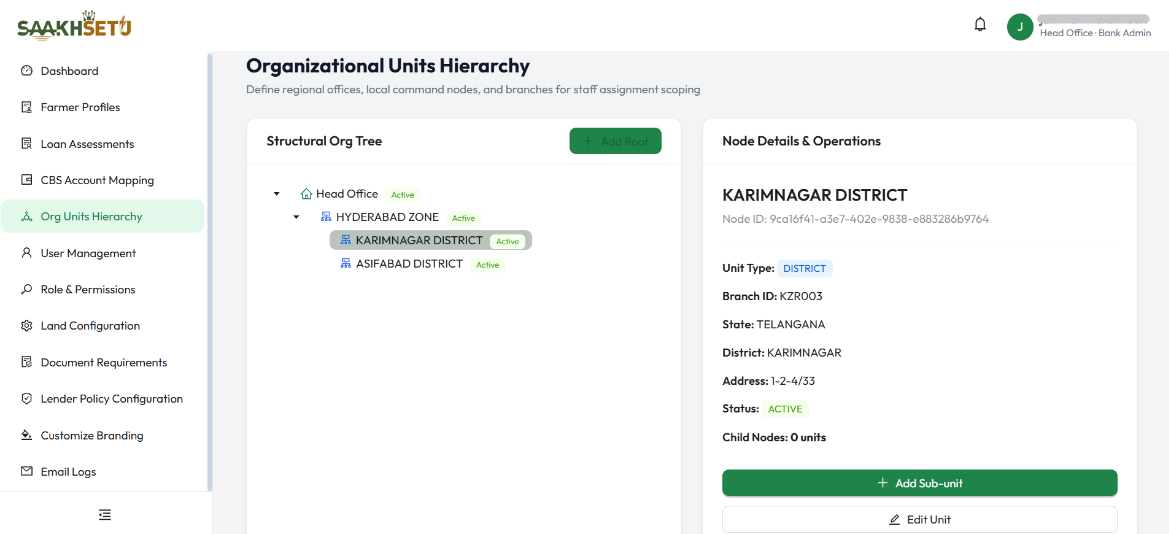
In this example, Karimnagar District is selected in the tree, so its details and the Add Sub-unit and Edit Unit buttons appear on the right. Add Root is greyed out because the bank already has a Head Office.
| Panel | What it shows |
|---|---|
| Structural Org Tree (left) | Every unit as an expandable tree. Icons show the level: a house for Head Office, a cluster for Zone, Region and District, and a pin for Branch. Each unit has an Active or Inactive tag |
| Node Details & Operations (right) | Details of the unit you select in the tree, and buttons to act on it |
Node Details shows these fields for the selected unit:
| Detail | Meaning |
|---|---|
| Name and Node ID | The unit's display name, and its internal system identifier (shown for support purposes) |
| Unit Type | Its level: HEAD OFFICE, ZONE, REGION, DISTRICT or BRANCH |
| Branch ID | Your bank's own code for the unit, or N/A |
| State, District, Address | Location details, or N/A if not entered |
| Status | ACTIVE or INACTIVE |
| Child Nodes | How many units sit directly below this one |
Create the Head Office (root)
- Open Org Units Hierarchy. A new bank shows No organization tree found.
- Select Add Root. This button is only available while the tree is empty.
- In Add Root Organizational Unit, fill in the fields (see the field reference). Hierarchy Scoping Level offers Head Office only.
- Select Add Unit.
Add a unit below another
- In the tree, select the parent unit.
- In Node Details & Operations, select Add Sub-unit. Branches do not have this button, because nothing can sit below a branch.
- In Add Sub-unit to parent name, choose the Hierarchy Scoping Level. Only the levels allowed below the parent are offered.
- Fill in the remaining fields and select Add Unit.
Edit a unit
- Select the unit in the tree, then select Edit Unit.
- Change any field. In edit mode you can also change Hierarchy Scoping Level and Parent Unit. Choosing another parent moves the unit, with everything below it, to a new place in the tree.
- Select Save Changes.
Moving units changes who sees what
Moving or re-levelling a unit changes which branch queues its assessments and staff belong to. Plan structural changes with operations before you make them.
Deactivate a unit
- Select the unit and select Deactivate Unit.
- Confirm with Yes, Deactivate.
SaakhSetu refuses to deactivate a unit while it still has:
| Blocker | Message | How to resolve |
|---|---|---|
| Active units below it | Cannot delete org unit because it has N active child units. | Deactivate or move the child units first |
| Active or pending users assigned to it | Cannot delete org unit because it has N active or pending users assigned. | Move those users to another unit in User Management, or suspend them |
Deactivated units stay in the tree with an Inactive tag, so their history is kept.
Field reference
| Field | Required | What to enter | Rules |
|---|---|---|---|
| Unit Display Name | Yes | The name staff will see, e.g. Pune East Branch | 1–50 characters. Must begin with a letter, in any script (English, Hindi and Marathi all work). Cannot be blank spaces |
| Hierarchy Scoping Level | Yes | Head Office, Zone, Region, District or Branch | When creating: limited to the levels allowed under the parent. When editing: any level |
| Parent Unit | Edit only | The unit this one sits under, or Root level | Choose a unit of a higher level |
| State | No | The state the unit is in, e.g. Maharashtra | Free text |
| District | No | The district the unit is in, e.g. Pune | Free text |
| Branch ID | No | Your bank's own branch or office code, e.g. PUN-EAST-001 | Must be unique across your bank. A duplicate is rejected |
| Address | No | The office's postal address | Up to 120 characters (a counter is shown) |
Use your CBS branch codes
Entering the same Branch ID your Core Banking System uses makes reports and reconciliation much easier later.